
.jpg)
.jpg)
you're finally settled in your favourite café corner, ideas flowing, only to be shackled to the nearest wall outlet by a dwindling battery meter. Your "portable" workstation feels anything but. This is the modern professional's paradox—craving lightweight design without sacrificing the freedom of untethered performance.
Enter the Lenovo Yoga Slim 6 14IMH9. On the surface, it's another sleek contender in the crowded premium laptop space. But look closer, and it reveals itself as a thoughtfully engineered answer to a core dilemma: how to achieve genuine all-day mobility. This isn't just about a spec sheet; it's about an experience designed to liberate you from power anxiety. By the end of this review, you'll have a clear picture of whether this device is the key to unlocking your truly mobile productivity, helping you cut through the confusion of marketing claims and find a machine that works as hard as you do, wherever you are.
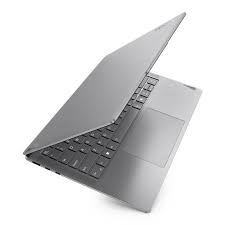
The Yoga Slim 6 14IMH9 sits at the intersection of intelligent design and practical performance. Our review model is built around an AMD Ryzen 5 7540U processor. This chip, based on the efficient Zen 4 architecture, is the strategic brain of the operation, balancing very capable performance with excellent power management for sustained workload handling. It's paired with 16 GB of fast LPDDR5 memory, which is soldered to the board, and a 1 TB NVMe SSD offering swift storage speeds. This combination forms a robust foundation for multitasking, from dozens of browser tabs to everyday office and creative applications, ensuring smooth operation without constant fan noise—a frequent annoyance in thinner devices.
The device features a 14-inch, 16:10 OLED display with a resolution of 1920 x 1200 pixels. This screen is the centrepiece of the user experience. The OLED technology delivers impeccable contrast with true blacks, making everything from text to multimedia content pop with exceptional clarity. While the 60Hz refresh rate is standard for productivity, the colour vibrancy and sharpness are where it shines, covering 100% of the sRGB colour space for accurate visual work.
Handling the graphics is the AMD Radeon 740M integrated GPU. This processor is more than capable for daily tasks, HD video streaming, and even some light, casual gaming. It efficiently drives the beautiful OLED panel without being a significant drain on the system's sustained energy reserves. For professionals whose work involves graphical applications or occasional photo editing, this capable iGPU, combined with the superb screen, offers a compelling and efficient package without the bulk and excessive power draw of a discrete graphics card.
Mobility is where the Yoga Slim 6 concept truly comes together. Crafted from aluminium, the chassis feels premium and sturdy, yet the entire package weighs just about 1.4 kilograms and is only 15 mm thin. This makes it an effortless companion in a bag. The design is clean and professional, with a hinge that allows the screen to lay flat at 180 degrees for easy sharing.
Connectivity is thoughtfully modern and sufficient. It includes two USB-C ports (one supporting USB4), a USB-A port for legacy accessories, and an HDMI 2.1 output. All ports are conveniently routed to the rear, keeping cables organised and desk space clean. Notably absent are an Ethernet port and a card reader, which aligns with its wireless, streamlined ethos.
The system's intelligent power management is a key feature. It works seamlessly with Windows 11 to optimise background activity and performance states. Features like the rapid recharge capability mean you can get hours of use from just a short charging session, a boon for students and professionals between classes or meetings. This holistic approach to efficient energy utilisation ensures the hardware is not just powerful, but also smart about how and when it uses its reserves.
Beyond the features, how does it perform under pressure? Our benchmarks reveal the engineered efficiency of the platform.
The Lenovo Yoga Slim 6 14IMH9 leaves a strong overall impression. It isn't the absolute most powerful machine in its category, but it executes its vision of intelligent, all-day mobile computing with remarkable cohesion. The standout OLED display, quiet and cool operation, genuinely portable form factor, and robust unplugged performance make it a compelling package.
It is ideally suited for:
If your priority is raw gaming power or heavy-duty video rendering, other machines with dedicated GPUs will serve you better. But for those who value a balanced, elegant, and truly liberating portable experience, the Yoga Slim 6 14IMH9 proves that with smart engineering, you don't have to sacrifice freedom for capability.
Ready to experience a new standard in mobile workflow efficiency? Explore how this device's thoughtful engineering in sustained mobile power delivery and intelligent energy allocation can transform your daily routine.
Imagine this: you're in the middle of a long work session, multiple browser tabs open, a document editor running, and a video call on the side. Suddenly, your computer starts to chug. The fan whirs loudly, the response lags, and that dreaded low-battery warning pops up—even though it's been plugged in for hours. If this scene feels familiar, you're not alone. Many find themselves trapped with a laptop that promises versatility but delivers frustration when pushed beyond basic tasks.
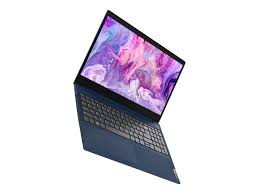
This article cuts through the common confusion and marketing hype surrounding affordable, all-purpose laptops. We're taking a deep dive into the Lenovo IdeaPad 15sALC, a model positioned as a solution for work, study, and entertainment. By the end of this review, you will have a clear, unbiased understanding of what this machine truly offers—its real-world strengths, its compromises, and most importantly, whether it can break the cycle of performance letdowns and genuinely meet the demands of a dynamic digital life. Let's begin by understanding what this device is designed to be.
The Lenovo IdeaPad 15sALC sits squarely in the essential notebook category. It's built not for cutting-edge gaming or professional content creation, but for the daily grind: office applications, web research, streaming media, and video communication. Its value proposition hinges on delivering reliable, no-fuss performance for these core tasks within a budget-conscious framework. The "ALC" designation points to its heart: an AMD Ryzen processor with Radeon graphics, aiming to offer better integrated performance than many basic Intel counterparts. For students, hybrid workers, and families, it represents a practical choice meant to handle the interconnected nature of modern computing without specialization.
At the core of the IdeaPad 15sALC lies an AMD Ryzen 5 or 7 series mobile processor. These chips are renowned for their strong multi-core performance, which is crucial for modern multitasking. Paired with this is typically 8GB or 12GB of DDR4 RAM, a spec that has become the baseline for ensuring smooth operation when switching between applications like a heavyweight browser, word processor, and messaging apps. Storage is handled by a 256GB or 512GB NVMe solid-state drive (SSD). This is a key differentiator from older or cheaper laptops that use slow hard disk drives (HDDs); the SSD ensures the system boots in seconds, applications launch rapidly, and the overall feel is snappy. This combination forms a foundation that prioritizes responsive everyday computing over raw power.
The laptop features a 15.6-inch display, a popular size that offers a good balance between screen real estate and portability. The standard resolution is Full HD (1920 x 1080), providing clear and sharp text and images—a must-have for avoiding eye strain during long periods of use. While high refresh rates and professional-grade color accuracy are not the focus here, the screen is adequate for its intended purposes: writing reports, watching videos, and browsing the web. The integrated AMD Radeon graphics handle this display output and can manage some light photo editing and casual gaming, but they are not built for demanding 3D rendering or high-frame-rate AAA titles.
True to its role as a daily companion, the IdeaPad 15sALC is designed with portability in mind. It maintains a relatively slim profile and light weight for a 15-inch device, making it easy to slip into a backpack for commuting or moving around the house. The build primarily uses plastic, which helps keep costs down, but attention is paid to structural rigidity to avoid excessive flex. The keyboard offers a standard typing experience with decent key travel, and the touchpad provides a reliable pointing interface.
Battery life is a critical pillar of its design philosophy. Equipped with a modern lithium-ion battery, it is engineered to last through a typical work or school day on a single charge under moderate use, such as web browsing and document work. This aligns with the growing user demand for devices that can untether them from power outlets, a trend heavily emphasized in the current market where extending notebook battery life is a top concern for manufacturers and consumers alike. The device also supports fast charging, allowing you to quickly top up the battery when time is short, a feature that has become nearly indispensable in mobile computing.
The laptop ships with Windows 11, providing a familiar and secure operating environment with regular updates. Lenovo includes its own suite of utility software for system management, driver updates, and hardware settings customization. The audio system, typically featuring dual speakers tuned with Dolby Audio, is sufficient for video calls and casual media consumption. Connectivity is comprehensive, with USB-C, USB-A, HDMI, and a headphone/mic combo jack covering most peripheral needs, alongside reliable Wi-Fi and Bluetooth. These features collectively aim to deliver a seamless and integrated upgrade for home office setup, reducing friction in a user's daily digital routine.
To move beyond specs, we subjected the IdeaPad 15sALC to a series of standardized and practical tests.
Core Computational Power: In CPU benchmarks like Cinebench, the Ryzen processor shows its competence. The single-core score is adequate for basic tasks, while the multi-core score is where it shines, easily outpacing older generation and dual-core competitors. Under sustained load, the processor maintains a steady power draw (typically around 15-25W in performance mode) with core temperatures staying within a safe range, usually below 85°C. Memory bandwidth is sufficient for its class, ensuring smooth data flow between the CPU, RAM, and storage.
Graphical Capabilities: The integrated Radeon graphics score predictably in benchmarks like 3DMark. In practical terms, this translates to smooth playback of 1080p video and the ability to run less demanding games like Minecraft or older esports titles at modest settings and resolutions. For more intensive games, frame rates will be lower. In creative tasks, it can handle basic video editing timelines but will slow down with complex effects or high-resolution footage.
Storage Speed: This is one of the laptop's strong suits. The NVMe SSD delivers excellent sequential read/write speeds, making large file transfers and system imaging surprisingly quick. More importantly, its random read/write performance—which affects how fast applications feel—is orders of magnitude better than a traditional HDD, directly contributing to the system's perceived responsiveness.
Thermal and Acoustic Profile: Under a combined CPU and GPU stress test , the cooling system works diligently. Both components stabilize at temperatures under 95°C, which is within the operational design limits for modern silicon. Performance is maintained consistently without major throttling, though the clock speeds may adjust slightly to manage heat. The fan noise becomes audible under this full load but remains a moderate whoosh rather than a high-pitched whine—it's noticeable in a quiet room but unlikely to be disruptive in a typical office environment.
The Lenovo IdeaPad 15sALC delivers a coherent and focused experience. It excels as a budget-friendly productivity laptop that reliably handles the fundamentals of modern computing. Its standout features are the responsive SSD, the capable multi-core AMD processor for multitasking, and the practical battery life that supports mobility. The build and display are functional and appropriate for the price.
It is not without compromises. The use of plastics, the standard 60Hz display, and the integrated graphics are clear cost-saving measures that define its boundaries. It is not suited for hardcore gamers, professional video editors, or those who demand a premium, all-metal chassis.
Ideal User Profiles:
If your needs align with these profiles, the IdeaPad 15sALC represents a smart, value-driven choice that avoids the common pitfall of underperformance in daily tasks. It proves that with the right core components, an affordable laptop can indeed be a dependable partner, freeing you from the anxiety of a slowing machine and letting you focus on your work and life. For those seeking to boost laptop longevity, starting with a well-specced machine like this is the best first step