
Laptop Battery
-
7800mah/87WH BP3S3P2600 Replacement Battery for Getac A790 338911120053(S)
The 7800mah/87WH Getac BP3S3P2600 Laptop Battery is specially designed as a high-quality replacement battery for Getac A790 338911120053(S). With stable performance, long-lasting power capacity, and excellent compatibility, this Getac BP3S3P2600 battery helps restore your equipment’s mobility and extends its daily working time. It is an ideal choice for users who need to replace an aging or damaged battery while keeping their Getac A790 338911120053(S) running efficiently.
7800mah/87WH BP3S3P2600 Replacement Battery for Getac A790 338911120053(S)
 Product SpecificationsBrand: Laptop Battery for GetacBattery Type: Li-ionBattery Voltage: 8.8V/11.1VBattery Capacity: 7800mah/87WHWarranty: 30 Days Money Back, 1 Year Warranty.Over 500-800 times of charge and discharge.Compatible Part Numbers:BP3S3P2600Compatible Models:Getac A790 338911120053 (S)Package Included:1PC BP3S3P2600 BatteryImportant Usage Tips and Safety PrecautionsFor safe and effective operation of the 7800mah/87WH Getac BP3S3P2600 Laptop Battery for Getac A790 338911120053(S), please consider the following precautions:Do not expose the battery to water, moisture, or extreme heat.Do not disassemble, modify, or damage the battery, as this may cause safety risks.Avoid using damaged charging cables or incompatible adapters.If the Getac BP3S3P2600 battery becomes swollen, overheated, or shows unusual performance, stop using it immediately and seek professional assistance.Allow the Getac BP3S3P2600 battery to complete several normal charge and discharge cycles after installation to help achieve optimal performance. A Reliable Power Solution for Your Getac A790 338911120053(S).How to Properly Maintain Your Getac BP3S3P2600 Laptop BatteryTo maximize the lifespan and performance of your Getac BP3S3P2600 Laptop Battery, following proper maintenance habits is important:Avoid frequent full discharge: Try to recharge the battery before it completely runs out of power. Keeping the Getac BP3S3P2600 battery level between approximately 20% and 80% can help reduce battery stress.Use the correct charger: Always use a compatible charger with the correct voltage and specifications to ensure safe and efficient charging.Keep the battery temperature controlled: Excessive heat can affect Getac BP3S3P2600 battery performance and lifespan. Avoid using your equipment on soft surfaces that block ventilation, and keep the device away from high-temperature environments.Charge regularly during storage: If you do not use your equipment for an extended period, charge the battery to around 40%-60% and store it in a cool, dry place.Maintain clean connections: Keep the Getac BP3S3P2600 battery contacts and equipment interior free from dust to ensure stable power transmission.A Reliable Power Solution for Your Getac A790 338911120053(S)The 7800mah/87WH Getac BP3S3P2600 Laptop Battery for Getac A790 338911120053(S) combines dependable power, convenient installation, and long-term usability. With proper care and responsible usage, this replacement battery can help extend your laptop’s service life and provide a more stable mobile computing experience.Choose a quality replacement battery for Getac BP3S3P2600 to bring your Getac A790 338911120053(S) back to its full potential and enjoy reliable performance wherever you go.
PR
-
2100 mAh/23 Wh 633-27 Replacement Battery for Anritsu S331B, S331D, S332B, S332D, MT9081 MT9080D MT9081D
The 2100 mAh/23 Wh Anritsu 633-27 Power Tool Battery is specially designed as a high-quality replacement battery for Anritsu S331B, S331D, S332B, S332D, MT9081 MT9080D MT9081D. With stable performance, long-lasting power capacity, and excellent compatibility, this Anritsu 633-27 battery helps restore your equipment’s mobility and extends its daily working time. It is an ideal choice for users who need to replace an aging or damaged battery while keeping their Anritsu S331B, S331D, S332B, S332D, MT9081 MT9080D MT9081D running efficiently.
2100 mAh/23 Wh 633-27 Replacement Battery for Anritsu S331B, S331D, S332B, S332D, MT9081 MT9080D MT9081D
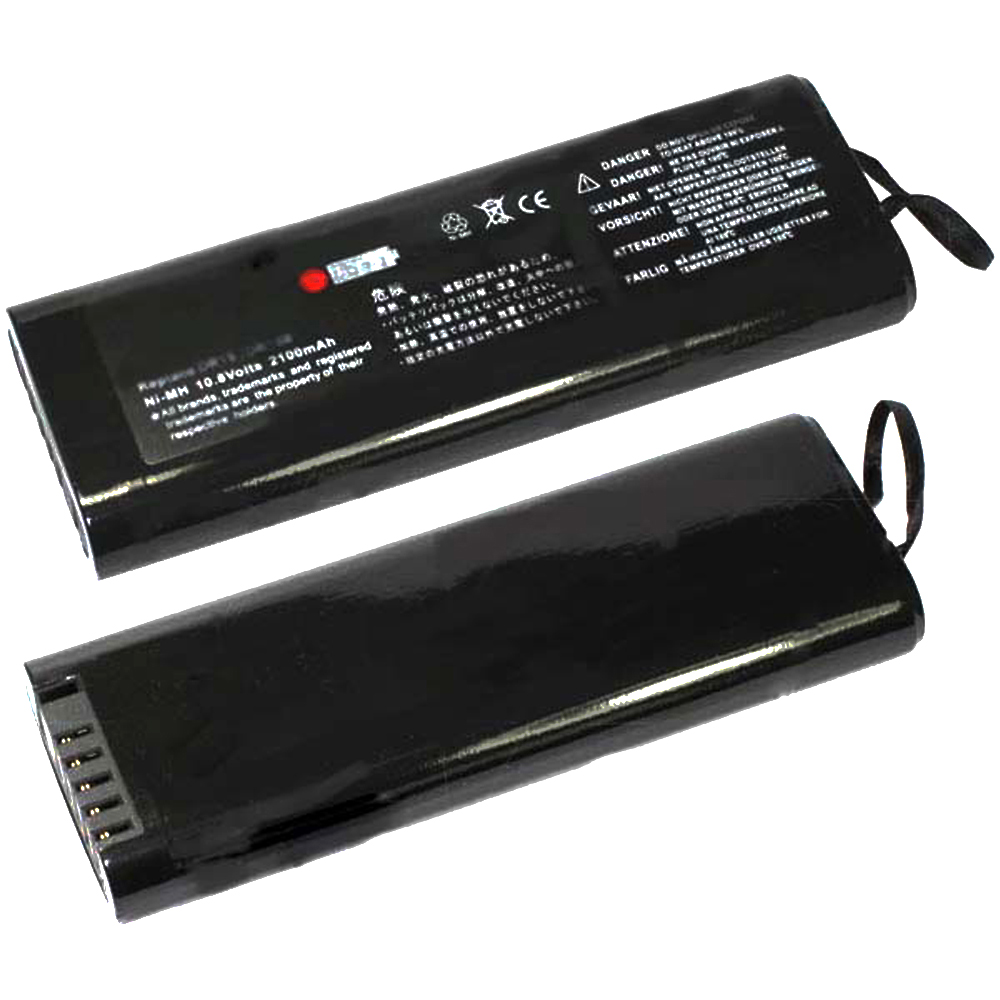 Product SpecificationsBrand: Power Tool Battery for AnritsuBattery Type: Li-ionBattery Voltage: 10.8 VBattery Capacity: 2100 mAh/23 WhWarranty: 30 Days Money Back, 1 Year Warranty.Over 500-800 times of charge and discharge.Compatible Part Numbers:633-27Compatible Models:Weight: 307.8 gAnritsu S331B, S331D, S332B, S332D, MT9081 MT9080D MT9081DImportant Usage Tips and Safety PrecautionsFor safe and effective operation of the 2100 mAh/23 Wh Anritsu 633-27 Power Tool Battery for Anritsu S331B, S331D, S332B, S332D, MT9081 MT9080D MT9081D, please consider the following precautions:Do not expose the battery to water, moisture, or extreme heat.Do not disassemble, modify, or damage the battery, as this may cause safety risks.Avoid using damaged charging cables or incompatible adapters.If the Anritsu 633-27 battery becomes swollen, overheated, or shows unusual performance, stop using it immediately and seek professional assistance.Allow the Anritsu 633-27 battery to complete several normal charge and discharge cycles after installation to help achieve optimal performance. A Reliable Power Solution for Your Anritsu S331B, S331D, S332B, S332D, MT9081 MT9080D MT9081D.How to Properly Maintain Your Anritsu 633-27 Power Tool BatteryTo maximize the lifespan and performance of your Anritsu 633-27 Power Tool Battery, following proper maintenance habits is important:Avoid frequent full discharge: Try to recharge the battery before it completely runs out of power. Keeping the Anritsu 633-27 battery level between approximately 20% and 80% can help reduce battery stress.Use the correct charger: Always use a compatible charger with the correct voltage and specifications to ensure safe and efficient charging.Keep the battery temperature controlled: Excessive heat can affect Anritsu 633-27 battery performance and lifespan. Avoid using your equipment on soft surfaces that block ventilation, and keep the device away from high-temperature environments.Charge regularly during storage: If you do not use your equipment for an extended period, charge the battery to around 40%-60% and store it in a cool, dry place.Maintain clean connections: Keep the Anritsu 633-27 battery contacts and equipment interior free from dust to ensure stable power transmission.A Reliable Power Solution for Your Anritsu S331B, S331D, S332B, S332D, MT9081 MT9080D MT9081DThe 2100 mAh/23 Wh Anritsu 633-27 Power Tool Battery for Anritsu S331B, S331D, S332B, S332D, MT9081 MT9080D MT9081D combines dependable power, convenient installation, and long-term usability. With proper care and responsible usage, this replacement battery can help extend your laptop’s service life and provide a more stable mobile computing experience.Choose a quality replacement battery for Anritsu 633-27 to bring your Anritsu S331B, S331D, S332B, S332D, MT9081 MT9080D MT9081D back to its full potential and enjoy reliable performance wherever you go.
-
5200mAh GXIDL-00-13-4S5050 Replacement Battery for Mechrevo Yaoshi 15 Pro
Our brand-new Laptop Battery compatible with Mechrevo GXIDL-00-13-4S5050 is engineered to deliver long-lasting and stable performance. It is designed to meet rigorous standards, ensuring full compatibility with devices such as the Mechrevo Yaoshi 15 Pro. This battery comes with a one-year warranty and has passed essential safety certifications including CE, RoHS, and ISO9001. Choose our Mechrevo GXIDL-00-13-4S5050 battery for a power solution that combines quality, safety, and convenience. Invest in authentic performance and keep your Mechrevo Yaoshi 15 Pro running like new.
5200mAh GXIDL-00-13-4S5050 Replacement Battery for Mechrevo Yaoshi 15 Pro
 Product SpecificationsBrand: Mechrevo Laptop BatteryBattery Type: Li-PolymerBattery Voltage: 15.4VBattery Capacity: 5200mAhWarranty: 30 Days Money Back, 1 Year Warranty.Over 500-800 times of charge and discharge.Compatible Part Numbers:
Compatible Models:for Mechrevo Yaoshi 15 Profor Mechrevo Jiaolong 16S 14XAAs a professional manufacturer, we offer a 100% brand new Li-Polymer battery for Mechrevo GXIDL-00-13-4S5050, built with genuine Grade A cells to ensure high quality and stable performance. Certified by CE, ROHS, and MSDS, this battery delivers excellent discharge characteristics and supports over 500–800 charge cycles.It is fully compatible with original Fujitsu equipment and features multiple built-in protections including over-charge, over-current, over-voltage, and short-circuit prevention. Designed with an advanced printed circuit board (PCB), it provides reliable and safe operation.Backed by a one-year warranty, 30-day money-back guarantee, and 100% secure shopping assurance, we provide premium performance at a competitive price.To ensure optimal performance and longevity of your Mechrevo GXIDL-00-13-4S5050 Battery, please adhere to the following guidelines:1.Storage - Store the battery GXIDL-00-13-4S5050 in a clean, dry, and cool environment, away from heat sources and metal objects. During storage, the battery will gradually self-discharge. It is recommended to store it at approximately 40% state of charge.2.Charging and Discharging - Unlike older battery technologies, lithium-ion batteries do not require frequent full discharge cycles. Only perform a full discharge approximately every 30 charging cycles. Avoid charging the battery beyond its specified threshold voltage.3.Regular Use - Avoid leaving the battery GXIDL-00-13-4S5050 idle for extended periods. It is advisable to use the battery at least once every two to three weeks. If the battery has been unused for a long time, follow the initial break-in procedure as recommended for new batteries.4.Calibration - If the battery indicator shows 76% or less during use, fully charge it, then fully discharge it, and finally recharge it completely to calibrate the battery level accuracy.5.Usage on Fixed Power - Consider removing the battery from the laptop when using a fixed power source for extended periods to reduce unnecessary charging cycles.6.Short-Circuit Prevention - Do not short-circuit the battery, as this can cause serious damage and compromise safety.By following these practices, you can help maintain the performance and extend the life of your Mechrevo GXIDL-00-13-4S5050 Battery.
Product SpecificationsBrand: Mechrevo Laptop BatteryBattery Type: Li-PolymerBattery Voltage: 15.4VBattery Capacity: 5200mAhWarranty: 30 Days Money Back, 1 Year Warranty.Over 500-800 times of charge and discharge.Compatible Part Numbers:
Compatible Models:for Mechrevo Yaoshi 15 Profor Mechrevo Jiaolong 16S 14XAAs a professional manufacturer, we offer a 100% brand new Li-Polymer battery for Mechrevo GXIDL-00-13-4S5050, built with genuine Grade A cells to ensure high quality and stable performance. Certified by CE, ROHS, and MSDS, this battery delivers excellent discharge characteristics and supports over 500–800 charge cycles.It is fully compatible with original Fujitsu equipment and features multiple built-in protections including over-charge, over-current, over-voltage, and short-circuit prevention. Designed with an advanced printed circuit board (PCB), it provides reliable and safe operation.Backed by a one-year warranty, 30-day money-back guarantee, and 100% secure shopping assurance, we provide premium performance at a competitive price.To ensure optimal performance and longevity of your Mechrevo GXIDL-00-13-4S5050 Battery, please adhere to the following guidelines:1.Storage - Store the battery GXIDL-00-13-4S5050 in a clean, dry, and cool environment, away from heat sources and metal objects. During storage, the battery will gradually self-discharge. It is recommended to store it at approximately 40% state of charge.2.Charging and Discharging - Unlike older battery technologies, lithium-ion batteries do not require frequent full discharge cycles. Only perform a full discharge approximately every 30 charging cycles. Avoid charging the battery beyond its specified threshold voltage.3.Regular Use - Avoid leaving the battery GXIDL-00-13-4S5050 idle for extended periods. It is advisable to use the battery at least once every two to three weeks. If the battery has been unused for a long time, follow the initial break-in procedure as recommended for new batteries.4.Calibration - If the battery indicator shows 76% or less during use, fully charge it, then fully discharge it, and finally recharge it completely to calibrate the battery level accuracy.5.Usage on Fixed Power - Consider removing the battery from the laptop when using a fixed power source for extended periods to reduce unnecessary charging cycles.6.Short-Circuit Prevention - Do not short-circuit the battery, as this can cause serious damage and compromise safety.By following these practices, you can help maintain the performance and extend the life of your Mechrevo GXIDL-00-13-4S5050 Battery.
-
8650mAh SP304 Replacement Battery for Siemens Simatic Field PG M4
Our brand-new Laptop Battery compatible with Siemens SP304 is engineered to deliver long-lasting and stable performance. It is designed to meet rigorous standards, ensuring full compatibility with devices such as the Siemens Simatic Field PG M4. This battery comes with a one-year warranty and has passed essential safety certifications including CE, RoHS, and ISO9001. Choose our Siemens SP304 battery for a power solution that combines quality, safety, and convenience. Invest in authentic performance and keep your Siemens Simatic Field PG M4 running like new.
8650mAh SP304 Replacement Battery for Siemens Simatic Field PG M4
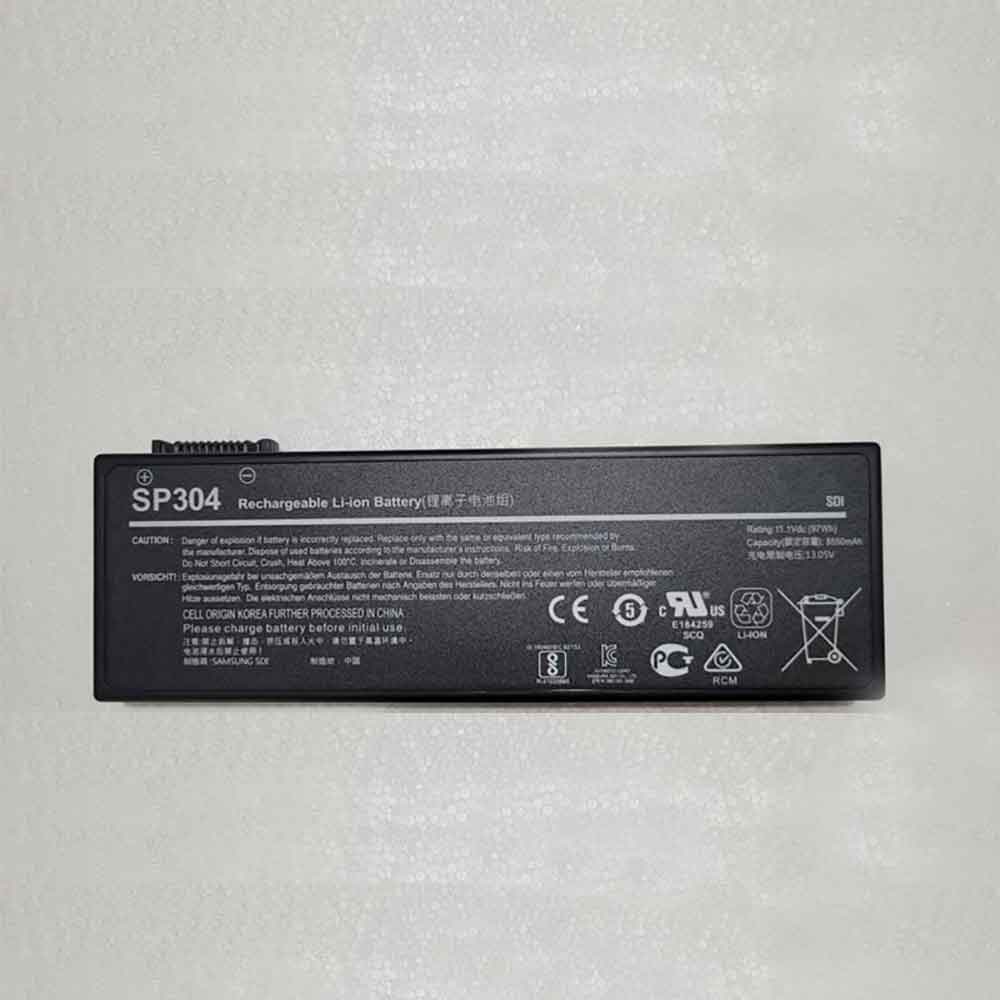 Product SpecificationsBrand: Siemens Laptop BatteryBattery Type: Li-ionBattery Voltage: 11.1VBattery Capacity: 8650mAhWarranty: 30 Days Money Back, 1 Year Warranty.Over 500-800 times of charge and discharge.Compatible Part Numbers:
Compatible Models:Siemens Simatic Field PG M4As a professional manufacturer, we offer a 100% brand new Li-ion battery for Siemens SP304, built with genuine Grade A cells to ensure high quality and stable performance. Certified by CE, ROHS, and MSDS, this battery delivers excellent discharge characteristics and supports over 500–800 charge cycles.It is fully compatible with original Fujitsu equipment and features multiple built-in protections including over-charge, over-current, over-voltage, and short-circuit prevention. Designed with an advanced printed circuit board (PCB), it provides reliable and safe operation.Backed by a one-year warranty, 30-day money-back guarantee, and 100% secure shopping assurance, we provide premium performance at a competitive price.To ensure optimal performance and longevity of your Siemens SP304 Battery, please adhere to the following guidelines:1.Storage - Store the battery SP304 in a clean, dry, and cool environment, away from heat sources and metal objects. During storage, the battery will gradually self-discharge. It is recommended to store it at approximately 40% state of charge.2.Charging and Discharging - Unlike older battery technologies, lithium-ion batteries do not require frequent full discharge cycles. Only perform a full discharge approximately every 30 charging cycles. Avoid charging the battery beyond its specified threshold voltage.3.Regular Use - Avoid leaving the battery SP304 idle for extended periods. It is advisable to use the battery at least once every two to three weeks. If the battery has been unused for a long time, follow the initial break-in procedure as recommended for new batteries.4.Calibration - If the battery indicator shows 76% or less during use, fully charge it, then fully discharge it, and finally recharge it completely to calibrate the battery level accuracy.5.Usage on Fixed Power - Consider removing the battery from the laptop when using a fixed power source for extended periods to reduce unnecessary charging cycles.6.Short-Circuit Prevention - Do not short-circuit the battery, as this can cause serious damage and compromise safety.By following these practices, you can help maintain the performance and extend the life of your Siemens SP304 Battery.
Product SpecificationsBrand: Siemens Laptop BatteryBattery Type: Li-ionBattery Voltage: 11.1VBattery Capacity: 8650mAhWarranty: 30 Days Money Back, 1 Year Warranty.Over 500-800 times of charge and discharge.Compatible Part Numbers:
Compatible Models:Siemens Simatic Field PG M4As a professional manufacturer, we offer a 100% brand new Li-ion battery for Siemens SP304, built with genuine Grade A cells to ensure high quality and stable performance. Certified by CE, ROHS, and MSDS, this battery delivers excellent discharge characteristics and supports over 500–800 charge cycles.It is fully compatible with original Fujitsu equipment and features multiple built-in protections including over-charge, over-current, over-voltage, and short-circuit prevention. Designed with an advanced printed circuit board (PCB), it provides reliable and safe operation.Backed by a one-year warranty, 30-day money-back guarantee, and 100% secure shopping assurance, we provide premium performance at a competitive price.To ensure optimal performance and longevity of your Siemens SP304 Battery, please adhere to the following guidelines:1.Storage - Store the battery SP304 in a clean, dry, and cool environment, away from heat sources and metal objects. During storage, the battery will gradually self-discharge. It is recommended to store it at approximately 40% state of charge.2.Charging and Discharging - Unlike older battery technologies, lithium-ion batteries do not require frequent full discharge cycles. Only perform a full discharge approximately every 30 charging cycles. Avoid charging the battery beyond its specified threshold voltage.3.Regular Use - Avoid leaving the battery SP304 idle for extended periods. It is advisable to use the battery at least once every two to three weeks. If the battery has been unused for a long time, follow the initial break-in procedure as recommended for new batteries.4.Calibration - If the battery indicator shows 76% or less during use, fully charge it, then fully discharge it, and finally recharge it completely to calibrate the battery level accuracy.5.Usage on Fixed Power - Consider removing the battery from the laptop when using a fixed power source for extended periods to reduce unnecessary charging cycles.6.Short-Circuit Prevention - Do not short-circuit the battery, as this can cause serious damage and compromise safety.By following these practices, you can help maintain the performance and extend the life of your Siemens SP304 Battery.
-
3950mAh K36 Replacement Battery for Beex ENZ K36 PRO X36 N36 GX1 GX2 BBEN IFUNK S STE003A GA15P
Our brand-new Laptop Battery compatible with Beex K36 is engineered to deliver long-lasting and stable performance. It is designed to meet rigorous standards, ensuring full compatibility with devices such as the Beex ENZ K36 PRO X36 N36 GX1 GX2 BBEN IFUNK S STE003A GA15P. This battery comes with a one-year warranty and has passed essential safety certifications including CE, RoHS, and ISO9001. Choose our Beex K36 battery for a power solution that combines quality, safety, and convenience. Invest in authentic performance and keep your Beex ENZ K36 PRO X36 N36 GX1 GX2 BBEN IFUNK S STE003A GA15P running like new.
3950mAh K36 Replacement Battery for Beex ENZ K36 PRO X36 N36 GX1 GX2 BBEN IFUNK S STE003A GA15P
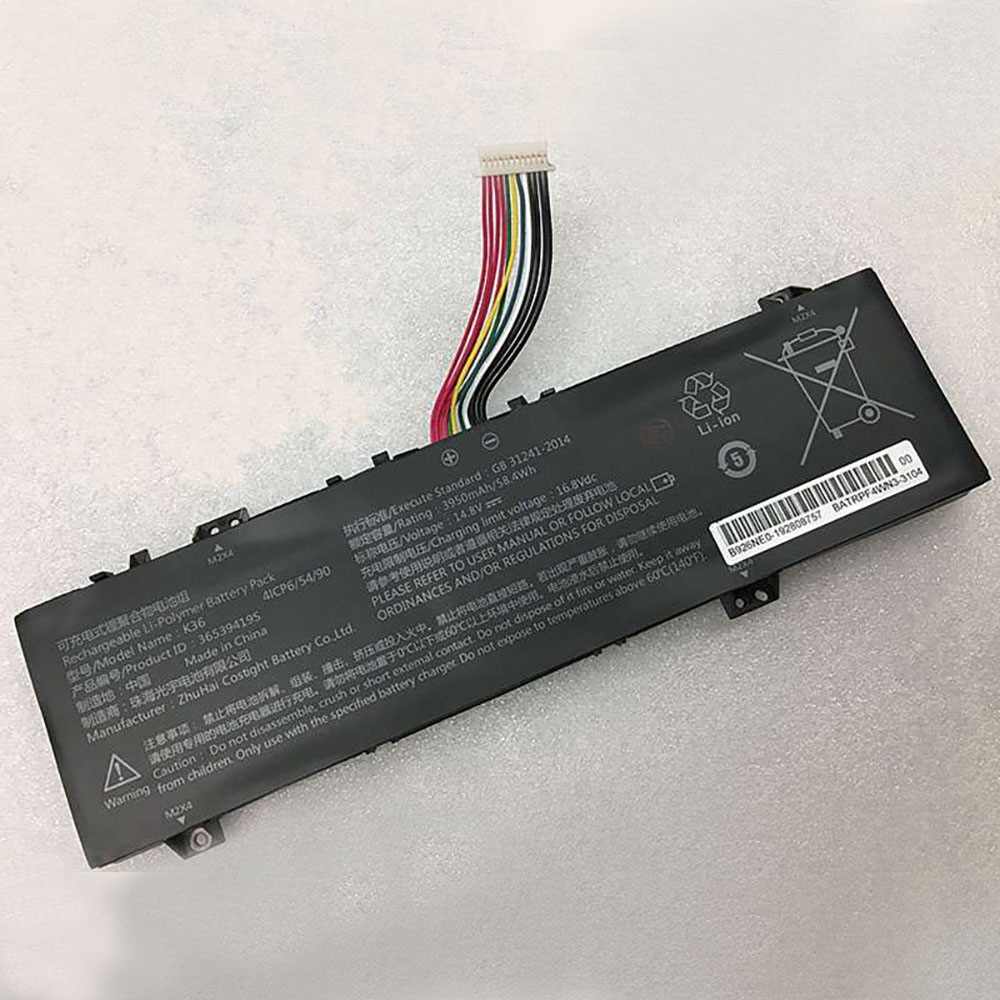 Product SpecificationsBrand: Beex Laptop BatteryBattery Type: Li-ionBattery Voltage: 14.8V/16.8VBattery Capacity: 3950mAhWarranty: 30 Days Money Back, 1 Year Warranty.Over 500-800 times of charge and discharge.Compatible Part Numbers:
Compatible Models:Beex ENZ K36 PRO X36 N36 GX1 GX2 BBEN IFUNK S STE003A GA15PAs a professional manufacturer, we offer a 100% brand new Li-ion battery for Beex K36, built with genuine Grade A cells to ensure high quality and stable performance. Certified by CE, ROHS, and MSDS, this battery delivers excellent discharge characteristics and supports over 500–800 charge cycles.It is fully compatible with original Fujitsu equipment and features multiple built-in protections including over-charge, over-current, over-voltage, and short-circuit prevention. Designed with an advanced printed circuit board (PCB), it provides reliable and safe operation.Backed by a one-year warranty, 30-day money-back guarantee, and 100% secure shopping assurance, we provide premium performance at a competitive price.To ensure optimal performance and longevity of your Beex K36 Battery, please adhere to the following guidelines:1.Storage - Store the battery K36 in a clean, dry, and cool environment, away from heat sources and metal objects. During storage, the battery will gradually self-discharge. It is recommended to store it at approximately 40% state of charge.2.Charging and Discharging - Unlike older battery technologies, lithium-ion batteries do not require frequent full discharge cycles. Only perform a full discharge approximately every 30 charging cycles. Avoid charging the battery beyond its specified threshold voltage.3.Regular Use - Avoid leaving the battery K36 idle for extended periods. It is advisable to use the battery at least once every two to three weeks. If the battery has been unused for a long time, follow the initial break-in procedure as recommended for new batteries.4.Calibration - If the battery indicator shows 76% or less during use, fully charge it, then fully discharge it, and finally recharge it completely to calibrate the battery level accuracy.5.Usage on Fixed Power - Consider removing the battery from the laptop when using a fixed power source for extended periods to reduce unnecessary charging cycles.6.Short-Circuit Prevention - Do not short-circuit the battery, as this can cause serious damage and compromise safety.By following these practices, you can help maintain the performance and extend the life of your Beex K36 Battery.
Product SpecificationsBrand: Beex Laptop BatteryBattery Type: Li-ionBattery Voltage: 14.8V/16.8VBattery Capacity: 3950mAhWarranty: 30 Days Money Back, 1 Year Warranty.Over 500-800 times of charge and discharge.Compatible Part Numbers:
Compatible Models:Beex ENZ K36 PRO X36 N36 GX1 GX2 BBEN IFUNK S STE003A GA15PAs a professional manufacturer, we offer a 100% brand new Li-ion battery for Beex K36, built with genuine Grade A cells to ensure high quality and stable performance. Certified by CE, ROHS, and MSDS, this battery delivers excellent discharge characteristics and supports over 500–800 charge cycles.It is fully compatible with original Fujitsu equipment and features multiple built-in protections including over-charge, over-current, over-voltage, and short-circuit prevention. Designed with an advanced printed circuit board (PCB), it provides reliable and safe operation.Backed by a one-year warranty, 30-day money-back guarantee, and 100% secure shopping assurance, we provide premium performance at a competitive price.To ensure optimal performance and longevity of your Beex K36 Battery, please adhere to the following guidelines:1.Storage - Store the battery K36 in a clean, dry, and cool environment, away from heat sources and metal objects. During storage, the battery will gradually self-discharge. It is recommended to store it at approximately 40% state of charge.2.Charging and Discharging - Unlike older battery technologies, lithium-ion batteries do not require frequent full discharge cycles. Only perform a full discharge approximately every 30 charging cycles. Avoid charging the battery beyond its specified threshold voltage.3.Regular Use - Avoid leaving the battery K36 idle for extended periods. It is advisable to use the battery at least once every two to three weeks. If the battery has been unused for a long time, follow the initial break-in procedure as recommended for new batteries.4.Calibration - If the battery indicator shows 76% or less during use, fully charge it, then fully discharge it, and finally recharge it completely to calibrate the battery level accuracy.5.Usage on Fixed Power - Consider removing the battery from the laptop when using a fixed power source for extended periods to reduce unnecessary charging cycles.6.Short-Circuit Prevention - Do not short-circuit the battery, as this can cause serious damage and compromise safety.By following these practices, you can help maintain the performance and extend the life of your Beex K36 Battery.
最新記事
(09/04)
(09/04)
(09/04)
(09/04)
(09/03)