
LENOVO
-
4.08Ah 45Wh 01AV413 Replacement Battery for Lenovo Thinkpad E470 E470C E475
The 4.08Ah 45Wh Lenovo 01AV413 Laptop Battery is specially designed as a high-quality replacement battery for Lenovo Thinkpad E470 E470C E475. With stable performance, long-lasting power capacity, and excellent compatibility, this Lenovo 01AV413 battery helps restore your equipment’s mobility and extends its daily working time. It is an ideal choice for users who need to replace an aging or damaged battery while keeping their Lenovo Thinkpad E470 E470C E475 running efficiently.
4.08Ah 45Wh 01AV413 Replacement Battery for Lenovo Thinkpad E470 E470C E475
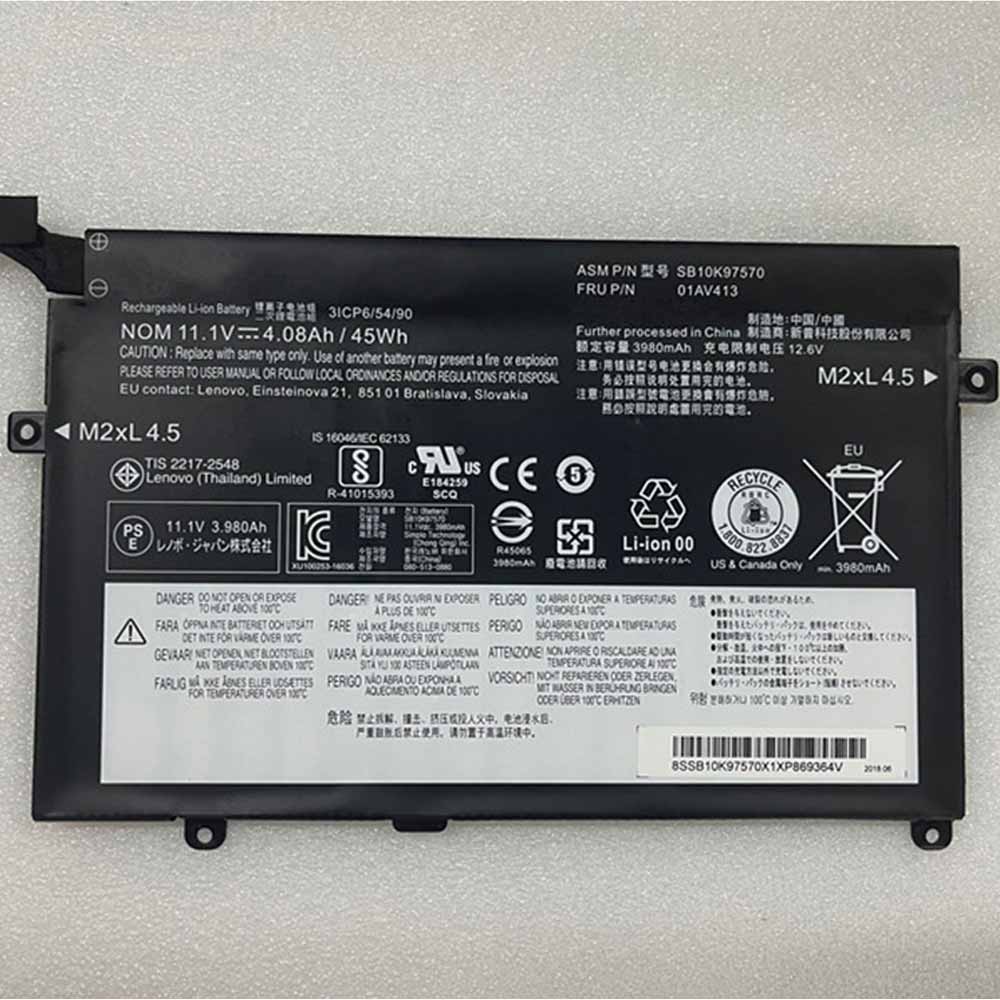 Product SpecificationsBrand: Laptop Battery for LenovoBattery Type: Li-ionBattery Voltage: 11.1V 12.6VBattery Capacity: 4.08Ah 45WhWarranty: 30 Days Money Back, 1 Year Warranty.Over 500-800 times of charge and discharge.Compatible Part Numbers:01AV41201AV413SB1R0K97570Compatible Models:Lenovo Thinkpad E470 E470C E475Important Usage Tips and Safety PrecautionsFor safe and effective operation of the 4.08Ah 45Wh Lenovo 01AV413 Laptop Battery for Lenovo Thinkpad E470 E470C E475, please consider the following precautions:Do not expose the battery to water, moisture, or extreme heat.Do not disassemble, modify, or damage the battery, as this may cause safety risks.Avoid using damaged charging cables or incompatible adapters.If the Lenovo 01AV413 battery becomes swollen, overheated, or shows unusual performance, stop using it immediately and seek professional assistance.Allow the Lenovo 01AV413 battery to complete several normal charge and discharge cycles after installation to help achieve optimal performance. A Reliable Power Solution for Your Lenovo Thinkpad E470 E470C E475.How to Properly Maintain Your Lenovo 01AV413 Laptop BatteryTo maximize the lifespan and performance of your Lenovo 01AV413 Laptop Battery, following proper maintenance habits is important:Avoid frequent full discharge: Try to recharge the battery before it completely runs out of power. Keeping the Lenovo 01AV413 battery level between approximately 20% and 80% can help reduce battery stress.Use the correct charger: Always use a compatible charger with the correct voltage and specifications to ensure safe and efficient charging.Keep the battery temperature controlled: Excessive heat can affect Lenovo 01AV413 battery performance and lifespan. Avoid using your equipment on soft surfaces that block ventilation, and keep the device away from high-temperature environments.Charge regularly during storage: If you do not use your equipment for an extended period, charge the battery to around 40%-60% and store it in a cool, dry place.Maintain clean connections: Keep the Lenovo 01AV413 battery contacts and equipment interior free from dust to ensure stable power transmission.A Reliable Power Solution for Your Lenovo Thinkpad E470 E470C E475The 4.08Ah 45Wh Lenovo 01AV413 Laptop Battery for Lenovo Thinkpad E470 E470C E475 combines dependable power, convenient installation, and long-term usability. With proper care and responsible usage, this replacement battery can help extend your laptop’s service life and provide a more stable mobile computing experience.Choose a quality replacement battery for Lenovo 01AV413 to bring your Lenovo Thinkpad E470 E470C E475 back to its full potential and enjoy reliable performance wherever you go.
PR
-
3564mAh L20D3P72 Replacement Battery for Lenovo ThinkPad X13 Gen 2
The 3564mAh Lenovo L20D3P72 Laptop Battery is specially designed as a high-quality replacement battery for Lenovo ThinkPad X13 Gen 2. With stable performance, long-lasting power capacity, and excellent compatibility, this Lenovo L20D3P72 battery helps restore your equipment’s mobility and extends its daily working time. It is an ideal choice for users who need to replace an aging or damaged battery while keeping their Lenovo ThinkPad X13 Gen 2 running efficiently.
3564mAh L20D3P72 Replacement Battery for Lenovo ThinkPad X13 Gen 2
.jpg) Product SpecificationsBrand: Laptop Battery for LenovoBattery Type: Li-ionBattery Voltage: 11.52VBattery Capacity: 3564mAhWarranty: 30 Days Money Back, 1 Year Warranty.Over 500-800 times of charge and discharge.Compatible Part Numbers:L20D3P72Compatible Models:for Lenovo ThinkPad X13 Gen 2Important Usage Tips and Safety PrecautionsFor safe and effective operation of the 3564mAh Lenovo L20D3P72 Laptop Battery for Lenovo ThinkPad X13 Gen 2, please consider the following precautions:Do not expose the battery to water, moisture, or extreme heat.Do not disassemble, modify, or damage the battery, as this may cause safety risks.Avoid using damaged charging cables or incompatible adapters.If the Lenovo L20D3P72 battery becomes swollen, overheated, or shows unusual performance, stop using it immediately and seek professional assistance.Allow the Lenovo L20D3P72 battery to complete several normal charge and discharge cycles after installation to help achieve optimal performance. A Reliable Power Solution for Your Lenovo ThinkPad X13 Gen 2.How to Properly Maintain Your Lenovo L20D3P72 Laptop BatteryTo maximize the lifespan and performance of your Lenovo L20D3P72 Laptop Battery, following proper maintenance habits is important:Avoid frequent full discharge: Try to recharge the battery before it completely runs out of power. Keeping the Lenovo L20D3P72 battery level between approximately 20% and 80% can help reduce battery stress.Use the correct charger: Always use a compatible charger with the correct voltage and specifications to ensure safe and efficient charging.Keep the battery temperature controlled: Excessive heat can affect Lenovo L20D3P72 battery performance and lifespan. Avoid using your equipment on soft surfaces that block ventilation, and keep the device away from high-temperature environments.Charge regularly during storage: If you do not use your equipment for an extended period, charge the battery to around 40%-60% and store it in a cool, dry place.Maintain clean connections: Keep the Lenovo L20D3P72 battery contacts and equipment interior free from dust to ensure stable power transmission.A Reliable Power Solution for Your Lenovo ThinkPad X13 Gen 2The 3564mAh Lenovo L20D3P72 Laptop Battery for Lenovo ThinkPad X13 Gen 2 combines dependable power, convenient installation, and long-term usability. With proper care and responsible usage, this replacement battery can help extend your laptop’s service life and provide a more stable mobile computing experience.Choose a quality replacement battery for Lenovo L20D3P72 to bring your Lenovo ThinkPad X13 Gen 2 back to its full potential and enjoy reliable performance wherever you go.
Product SpecificationsBrand: Laptop Battery for LenovoBattery Type: Li-ionBattery Voltage: 11.52VBattery Capacity: 3564mAhWarranty: 30 Days Money Back, 1 Year Warranty.Over 500-800 times of charge and discharge.Compatible Part Numbers:L20D3P72Compatible Models:for Lenovo ThinkPad X13 Gen 2Important Usage Tips and Safety PrecautionsFor safe and effective operation of the 3564mAh Lenovo L20D3P72 Laptop Battery for Lenovo ThinkPad X13 Gen 2, please consider the following precautions:Do not expose the battery to water, moisture, or extreme heat.Do not disassemble, modify, or damage the battery, as this may cause safety risks.Avoid using damaged charging cables or incompatible adapters.If the Lenovo L20D3P72 battery becomes swollen, overheated, or shows unusual performance, stop using it immediately and seek professional assistance.Allow the Lenovo L20D3P72 battery to complete several normal charge and discharge cycles after installation to help achieve optimal performance. A Reliable Power Solution for Your Lenovo ThinkPad X13 Gen 2.How to Properly Maintain Your Lenovo L20D3P72 Laptop BatteryTo maximize the lifespan and performance of your Lenovo L20D3P72 Laptop Battery, following proper maintenance habits is important:Avoid frequent full discharge: Try to recharge the battery before it completely runs out of power. Keeping the Lenovo L20D3P72 battery level between approximately 20% and 80% can help reduce battery stress.Use the correct charger: Always use a compatible charger with the correct voltage and specifications to ensure safe and efficient charging.Keep the battery temperature controlled: Excessive heat can affect Lenovo L20D3P72 battery performance and lifespan. Avoid using your equipment on soft surfaces that block ventilation, and keep the device away from high-temperature environments.Charge regularly during storage: If you do not use your equipment for an extended period, charge the battery to around 40%-60% and store it in a cool, dry place.Maintain clean connections: Keep the Lenovo L20D3P72 battery contacts and equipment interior free from dust to ensure stable power transmission.A Reliable Power Solution for Your Lenovo ThinkPad X13 Gen 2The 3564mAh Lenovo L20D3P72 Laptop Battery for Lenovo ThinkPad X13 Gen 2 combines dependable power, convenient installation, and long-term usability. With proper care and responsible usage, this replacement battery can help extend your laptop’s service life and provide a more stable mobile computing experience.Choose a quality replacement battery for Lenovo L20D3P72 to bring your Lenovo ThinkPad X13 Gen 2 back to its full potential and enjoy reliable performance wherever you go.
-
3000mAh 11.5WH BL295 Replacement Battery for Lenovo K5S L38031
The 3000mAh 11.5WH Lenovo BL295 Smartphone Battery is specially designed as a high-quality replacement battery for Lenovo K5S L38031. With stable performance, long-lasting power capacity, and excellent compatibility, this Lenovo BL295 battery helps restore your equipment’s mobility and extends its daily working time. It is an ideal choice for users who need to replace an aging or damaged battery while keeping their Lenovo K5S L38031 running efficiently.
3000mAh 11.5WH BL295 Replacement Battery for Lenovo K5S L38031
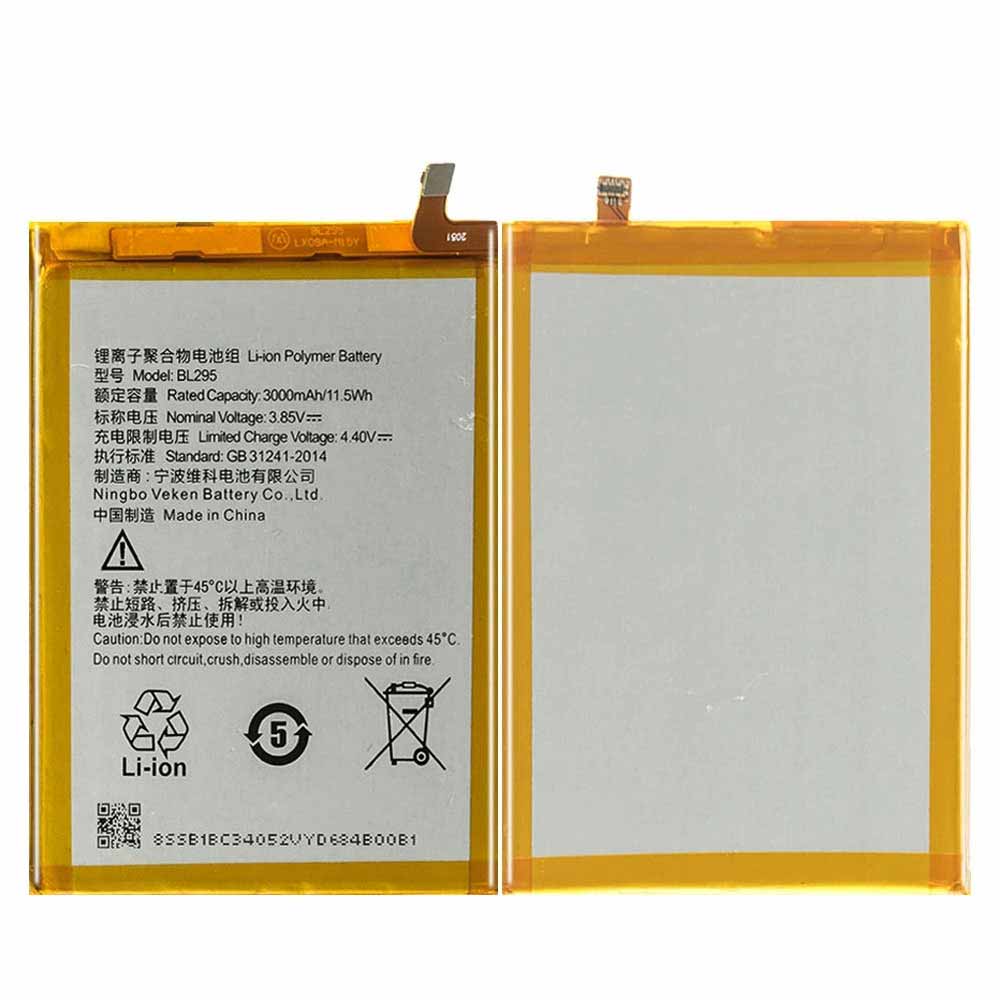 Product SpecificationsBrand: Smartphone Battery for LenovoBattery Type: Li-ionBattery Voltage: 3.85V 4.4VBattery Capacity: 3000mAh 11.5WHWarranty: 30 Days Money Back, 1 Year Warranty.Over 500-800 times of charge and discharge.Compatible Part Numbers:BL295Compatible Models:Lenovo K5S L38031Important Usage Tips and Safety PrecautionsFor safe and effective operation of the 3000mAh 11.5WH Lenovo BL295 Smartphone Battery for Lenovo K5S L38031, please consider the following precautions:Do not expose the battery to water, moisture, or extreme heat.Do not disassemble, modify, or damage the battery, as this may cause safety risks.Avoid using damaged charging cables or incompatible adapters.If the Lenovo BL295 battery becomes swollen, overheated, or shows unusual performance, stop using it immediately and seek professional assistance.Allow the Lenovo BL295 battery to complete several normal charge and discharge cycles after installation to help achieve optimal performance. A Reliable Power Solution for Your Lenovo K5S L38031.How to Properly Maintain Your Lenovo BL295 Smartphone BatteryTo maximize the lifespan and performance of your Lenovo BL295 Smartphone Battery, following proper maintenance habits is important:Avoid frequent full discharge: Try to recharge the battery before it completely runs out of power. Keeping the Lenovo BL295 battery level between approximately 20% and 80% can help reduce battery stress.Use the correct charger: Always use a compatible charger with the correct voltage and specifications to ensure safe and efficient charging.Keep the battery temperature controlled: Excessive heat can affect Lenovo BL295 battery performance and lifespan. Avoid using your equipment on soft surfaces that block ventilation, and keep the device away from high-temperature environments.Charge regularly during storage: If you do not use your equipment for an extended period, charge the battery to around 40%-60% and store it in a cool, dry place.Maintain clean connections: Keep the Lenovo BL295 battery contacts and equipment interior free from dust to ensure stable power transmission.A Reliable Power Solution for Your Lenovo K5S L38031The 3000mAh 11.5WH Lenovo BL295 Smartphone Battery for Lenovo K5S L38031 combines dependable power, convenient installation, and long-term usability. With proper care and responsible usage, this replacement battery can help extend your laptop’s service life and provide a more stable mobile computing experience.Choose a quality replacement battery for Lenovo BL295 to bring your Lenovo K5S L38031 back to its full potential and enjoy reliable performance wherever you go.
-
3510mAh L24M4P72 Replacement Battery for Lenovo ThinkPad L13 Gen 6
The 3510mAh Lenovo L24M4P72 Laptop Battery is specially designed as a high-quality replacement battery for Lenovo ThinkPad L13 Gen 6. With stable performance, long-lasting power capacity, and excellent compatibility, this Lenovo L24M4P72 battery helps restore your equipment’s mobility and extends its daily working time. It is an ideal choice for users who need to replace an aging or damaged battery while keeping their Lenovo ThinkPad L13 Gen 6 running efficiently.
3510mAh L24M4P72 Replacement Battery for Lenovo ThinkPad L13 Gen 6
.jpg) Product SpecificationsBrand: Laptop Battery for LenovoBattery Type: Li-ionBattery Voltage: 15.6VBattery Capacity: 3510mAhWarranty: 30 Days Money Back, 1 Year Warranty.Over 500-800 times of charge and discharge.Compatible Part Numbers:L24M4P72Compatible Models:for Lenovo ThinkPad L13 Gen 6for Lenovo ThinkPad S2 Gen 10 2-in-1 SeriesImportant Usage Tips and Safety PrecautionsFor safe and effective operation of the 3510mAh Lenovo L24M4P72 Laptop Battery for Lenovo ThinkPad L13 Gen 6, please consider the following precautions:Do not expose the battery to water, moisture, or extreme heat.Do not disassemble, modify, or damage the battery, as this may cause safety risks.Avoid using damaged charging cables or incompatible adapters.If the Lenovo L24M4P72 battery becomes swollen, overheated, or shows unusual performance, stop using it immediately and seek professional assistance.Allow the Lenovo L24M4P72 battery to complete several normal charge and discharge cycles after installation to help achieve optimal performance. A Reliable Power Solution for Your Lenovo ThinkPad L13 Gen 6.How to Properly Maintain Your Lenovo L24M4P72 Laptop BatteryTo maximize the lifespan and performance of your Lenovo L24M4P72 Laptop Battery, following proper maintenance habits is important:Avoid frequent full discharge: Try to recharge the battery before it completely runs out of power. Keeping the Lenovo L24M4P72 battery level between approximately 20% and 80% can help reduce battery stress.Use the correct charger: Always use a compatible charger with the correct voltage and specifications to ensure safe and efficient charging.Keep the battery temperature controlled: Excessive heat can affect Lenovo L24M4P72 battery performance and lifespan. Avoid using your equipment on soft surfaces that block ventilation, and keep the device away from high-temperature environments.Charge regularly during storage: If you do not use your equipment for an extended period, charge the battery to around 40%-60% and store it in a cool, dry place.Maintain clean connections: Keep the Lenovo L24M4P72 battery contacts and equipment interior free from dust to ensure stable power transmission.A Reliable Power Solution for Your Lenovo ThinkPad L13 Gen 6The 3510mAh Lenovo L24M4P72 Laptop Battery for Lenovo ThinkPad L13 Gen 6 combines dependable power, convenient installation, and long-term usability. With proper care and responsible usage, this replacement battery can help extend your laptop’s service life and provide a more stable mobile computing experience.Choose a quality replacement battery for Lenovo L24M4P72 to bring your Lenovo ThinkPad L13 Gen 6 back to its full potential and enjoy reliable performance wherever you go.
Product SpecificationsBrand: Laptop Battery for LenovoBattery Type: Li-ionBattery Voltage: 15.6VBattery Capacity: 3510mAhWarranty: 30 Days Money Back, 1 Year Warranty.Over 500-800 times of charge and discharge.Compatible Part Numbers:L24M4P72Compatible Models:for Lenovo ThinkPad L13 Gen 6for Lenovo ThinkPad S2 Gen 10 2-in-1 SeriesImportant Usage Tips and Safety PrecautionsFor safe and effective operation of the 3510mAh Lenovo L24M4P72 Laptop Battery for Lenovo ThinkPad L13 Gen 6, please consider the following precautions:Do not expose the battery to water, moisture, or extreme heat.Do not disassemble, modify, or damage the battery, as this may cause safety risks.Avoid using damaged charging cables or incompatible adapters.If the Lenovo L24M4P72 battery becomes swollen, overheated, or shows unusual performance, stop using it immediately and seek professional assistance.Allow the Lenovo L24M4P72 battery to complete several normal charge and discharge cycles after installation to help achieve optimal performance. A Reliable Power Solution for Your Lenovo ThinkPad L13 Gen 6.How to Properly Maintain Your Lenovo L24M4P72 Laptop BatteryTo maximize the lifespan and performance of your Lenovo L24M4P72 Laptop Battery, following proper maintenance habits is important:Avoid frequent full discharge: Try to recharge the battery before it completely runs out of power. Keeping the Lenovo L24M4P72 battery level between approximately 20% and 80% can help reduce battery stress.Use the correct charger: Always use a compatible charger with the correct voltage and specifications to ensure safe and efficient charging.Keep the battery temperature controlled: Excessive heat can affect Lenovo L24M4P72 battery performance and lifespan. Avoid using your equipment on soft surfaces that block ventilation, and keep the device away from high-temperature environments.Charge regularly during storage: If you do not use your equipment for an extended period, charge the battery to around 40%-60% and store it in a cool, dry place.Maintain clean connections: Keep the Lenovo L24M4P72 battery contacts and equipment interior free from dust to ensure stable power transmission.A Reliable Power Solution for Your Lenovo ThinkPad L13 Gen 6The 3510mAh Lenovo L24M4P72 Laptop Battery for Lenovo ThinkPad L13 Gen 6 combines dependable power, convenient installation, and long-term usability. With proper care and responsible usage, this replacement battery can help extend your laptop’s service life and provide a more stable mobile computing experience.Choose a quality replacement battery for Lenovo L24M4P72 to bring your Lenovo ThinkPad L13 Gen 6 back to its full potential and enjoy reliable performance wherever you go.
-
3910mAh L16M4PB0 Replacement Battery for Lenovo Legion Y720-15IKB Series
The 3910mAh Lenovo L16M4PB0 Laptop Battery is specially designed as a high-quality replacement battery for Lenovo Legion Y720-15IKB Series. With stable performance, long-lasting power capacity, and excellent compatibility, this Lenovo L16M4PB0 battery helps restore your equipment’s mobility and extends its daily working time. It is an ideal choice for users who need to replace an aging or damaged battery while keeping their Lenovo Legion Y720-15IKB Series running efficiently.
3910mAh L16M4PB0 Replacement Battery for Lenovo Legion Y720-15IKB Series
.jpg) Product SpecificationsBrand: Laptop Battery for LenovoBattery Type: Li-ionBattery Voltage: 15.36VBattery Capacity: 3910mAhWarranty: 30 Days Money Back, 1 Year Warranty.Over 500-800 times of charge and discharge.Compatible Part Numbers:L16M4PB0Compatible Models:for Lenovo Legion Y720-15IKB SeriesImportant Usage Tips and Safety PrecautionsFor safe and effective operation of the 3910mAh Lenovo L16M4PB0 Laptop Battery for Lenovo Legion Y720-15IKB Series, please consider the following precautions:Do not expose the battery to water, moisture, or extreme heat.Do not disassemble, modify, or damage the battery, as this may cause safety risks.Avoid using damaged charging cables or incompatible adapters.If the Lenovo L16M4PB0 battery becomes swollen, overheated, or shows unusual performance, stop using it immediately and seek professional assistance.Allow the Lenovo L16M4PB0 battery to complete several normal charge and discharge cycles after installation to help achieve optimal performance. A Reliable Power Solution for Your Lenovo Legion Y720-15IKB Series.How to Properly Maintain Your Lenovo L16M4PB0 Laptop BatteryTo maximize the lifespan and performance of your Lenovo L16M4PB0 Laptop Battery, following proper maintenance habits is important:Avoid frequent full discharge: Try to recharge the battery before it completely runs out of power. Keeping the Lenovo L16M4PB0 battery level between approximately 20% and 80% can help reduce battery stress.Use the correct charger: Always use a compatible charger with the correct voltage and specifications to ensure safe and efficient charging.Keep the battery temperature controlled: Excessive heat can affect Lenovo L16M4PB0 battery performance and lifespan. Avoid using your equipment on soft surfaces that block ventilation, and keep the device away from high-temperature environments.Charge regularly during storage: If you do not use your equipment for an extended period, charge the battery to around 40%-60% and store it in a cool, dry place.Maintain clean connections: Keep the Lenovo L16M4PB0 battery contacts and equipment interior free from dust to ensure stable power transmission.A Reliable Power Solution for Your Lenovo Legion Y720-15IKB SeriesThe 3910mAh Lenovo L16M4PB0 Laptop Battery for Lenovo Legion Y720-15IKB Series combines dependable power, convenient installation, and long-term usability. With proper care and responsible usage, this replacement battery can help extend your laptop’s service life and provide a more stable mobile computing experience.Choose a quality replacement battery for Lenovo L16M4PB0 to bring your Lenovo Legion Y720-15IKB Series back to its full potential and enjoy reliable performance wherever you go.
Product SpecificationsBrand: Laptop Battery for LenovoBattery Type: Li-ionBattery Voltage: 15.36VBattery Capacity: 3910mAhWarranty: 30 Days Money Back, 1 Year Warranty.Over 500-800 times of charge and discharge.Compatible Part Numbers:L16M4PB0Compatible Models:for Lenovo Legion Y720-15IKB SeriesImportant Usage Tips and Safety PrecautionsFor safe and effective operation of the 3910mAh Lenovo L16M4PB0 Laptop Battery for Lenovo Legion Y720-15IKB Series, please consider the following precautions:Do not expose the battery to water, moisture, or extreme heat.Do not disassemble, modify, or damage the battery, as this may cause safety risks.Avoid using damaged charging cables or incompatible adapters.If the Lenovo L16M4PB0 battery becomes swollen, overheated, or shows unusual performance, stop using it immediately and seek professional assistance.Allow the Lenovo L16M4PB0 battery to complete several normal charge and discharge cycles after installation to help achieve optimal performance. A Reliable Power Solution for Your Lenovo Legion Y720-15IKB Series.How to Properly Maintain Your Lenovo L16M4PB0 Laptop BatteryTo maximize the lifespan and performance of your Lenovo L16M4PB0 Laptop Battery, following proper maintenance habits is important:Avoid frequent full discharge: Try to recharge the battery before it completely runs out of power. Keeping the Lenovo L16M4PB0 battery level between approximately 20% and 80% can help reduce battery stress.Use the correct charger: Always use a compatible charger with the correct voltage and specifications to ensure safe and efficient charging.Keep the battery temperature controlled: Excessive heat can affect Lenovo L16M4PB0 battery performance and lifespan. Avoid using your equipment on soft surfaces that block ventilation, and keep the device away from high-temperature environments.Charge regularly during storage: If you do not use your equipment for an extended period, charge the battery to around 40%-60% and store it in a cool, dry place.Maintain clean connections: Keep the Lenovo L16M4PB0 battery contacts and equipment interior free from dust to ensure stable power transmission.A Reliable Power Solution for Your Lenovo Legion Y720-15IKB SeriesThe 3910mAh Lenovo L16M4PB0 Laptop Battery for Lenovo Legion Y720-15IKB Series combines dependable power, convenient installation, and long-term usability. With proper care and responsible usage, this replacement battery can help extend your laptop’s service life and provide a more stable mobile computing experience.Choose a quality replacement battery for Lenovo L16M4PB0 to bring your Lenovo Legion Y720-15IKB Series back to its full potential and enjoy reliable performance wherever you go.
最新記事
(09/04)
(09/04)
(09/04)
(09/04)
(09/03)