
Battery
-
5000mAh HK3150 Replacement Battery for PDA HK3150
Our brand-new Consumer Electronics Battery compatible with Other HK3150 is engineered to deliver long-lasting and stable performance. It is designed to meet rigorous standards, ensuring full compatibility with devices such as the PDA HK3150. This battery comes with a one-year warranty and has passed essential safety certifications including CE, RoHS, and ISO9001. Choose our Other HK3150 battery for a power solution that combines quality, safety, and convenience. Invest in authentic performance and keep your PDA HK3150 running like new.
5000mAh HK3150 Replacement Battery for PDA HK3150
.jpg) Product SpecificationsBrand: Other Consumer Electronics BatteryBattery Type: Li-ionBattery Voltage: 3.63VBattery Capacity: 5000mAhWarranty: 30 Days Money Back, 1 Year Warranty.Over 500-800 times of charge and discharge.Compatible Part Numbers:
Compatible Models:for PDA HK3150As a professional manufacturer, we offer a 100% brand new Li-ion battery for Other HK3150, built with genuine Grade A cells to ensure high quality and stable performance. Certified by CE, ROHS, and MSDS, this battery delivers excellent discharge characteristics and supports over 500–800 charge cycles.It is fully compatible with original Fujitsu equipment and features multiple built-in protections including over-charge, over-current, over-voltage, and short-circuit prevention. Designed with an advanced printed circuit board (PCB), it provides reliable and safe operation.Backed by a one-year warranty, 30-day money-back guarantee, and 100% secure shopping assurance, we provide premium performance at a competitive price.To ensure optimal performance and longevity of your Other HK3150 Battery, please adhere to the following guidelines:1.Storage - Store the battery HK3150 in a clean, dry, and cool environment, away from heat sources and metal objects. During storage, the battery will gradually self-discharge. It is recommended to store it at approximately 40% state of charge.2.Charging and Discharging - Unlike older battery technologies, lithium-ion batteries do not require frequent full discharge cycles. Only perform a full discharge approximately every 30 charging cycles. Avoid charging the battery beyond its specified threshold voltage.3.Regular Use - Avoid leaving the battery HK3150 idle for extended periods. It is advisable to use the battery at least once every two to three weeks. If the battery has been unused for a long time, follow the initial break-in procedure as recommended for new batteries.4.Calibration - If the battery indicator shows 76% or less during use, fully charge it, then fully discharge it, and finally recharge it completely to calibrate the battery level accuracy.5.Usage on Fixed Power - Consider removing the battery from the laptop when using a fixed power source for extended periods to reduce unnecessary charging cycles.6.Short-Circuit Prevention - Do not short-circuit the battery, as this can cause serious damage and compromise safety.By following these practices, you can help maintain the performance and extend the life of your Other HK3150 Battery.
Product SpecificationsBrand: Other Consumer Electronics BatteryBattery Type: Li-ionBattery Voltage: 3.63VBattery Capacity: 5000mAhWarranty: 30 Days Money Back, 1 Year Warranty.Over 500-800 times of charge and discharge.Compatible Part Numbers:
Compatible Models:for PDA HK3150As a professional manufacturer, we offer a 100% brand new Li-ion battery for Other HK3150, built with genuine Grade A cells to ensure high quality and stable performance. Certified by CE, ROHS, and MSDS, this battery delivers excellent discharge characteristics and supports over 500–800 charge cycles.It is fully compatible with original Fujitsu equipment and features multiple built-in protections including over-charge, over-current, over-voltage, and short-circuit prevention. Designed with an advanced printed circuit board (PCB), it provides reliable and safe operation.Backed by a one-year warranty, 30-day money-back guarantee, and 100% secure shopping assurance, we provide premium performance at a competitive price.To ensure optimal performance and longevity of your Other HK3150 Battery, please adhere to the following guidelines:1.Storage - Store the battery HK3150 in a clean, dry, and cool environment, away from heat sources and metal objects. During storage, the battery will gradually self-discharge. It is recommended to store it at approximately 40% state of charge.2.Charging and Discharging - Unlike older battery technologies, lithium-ion batteries do not require frequent full discharge cycles. Only perform a full discharge approximately every 30 charging cycles. Avoid charging the battery beyond its specified threshold voltage.3.Regular Use - Avoid leaving the battery HK3150 idle for extended periods. It is advisable to use the battery at least once every two to three weeks. If the battery has been unused for a long time, follow the initial break-in procedure as recommended for new batteries.4.Calibration - If the battery indicator shows 76% or less during use, fully charge it, then fully discharge it, and finally recharge it completely to calibrate the battery level accuracy.5.Usage on Fixed Power - Consider removing the battery from the laptop when using a fixed power source for extended periods to reduce unnecessary charging cycles.6.Short-Circuit Prevention - Do not short-circuit the battery, as this can cause serious damage and compromise safety.By following these practices, you can help maintain the performance and extend the life of your Other HK3150 Battery.
PR
-
450mAh IP462539 Replacement Battery for Phonak ComPilot II
Our brand-new Medical Battery compatible with Phonak IP462539 is engineered to deliver long-lasting and stable performance. It is designed to meet rigorous standards, ensuring full compatibility with devices such as the Phonak ComPilot II. This battery comes with a one-year warranty and has passed essential safety certifications including CE, RoHS, and ISO9001. Choose our Phonak IP462539 battery for a power solution that combines quality, safety, and convenience. Invest in authentic performance and keep your Phonak ComPilot II running like new.
450mAh IP462539 Replacement Battery for Phonak ComPilot II
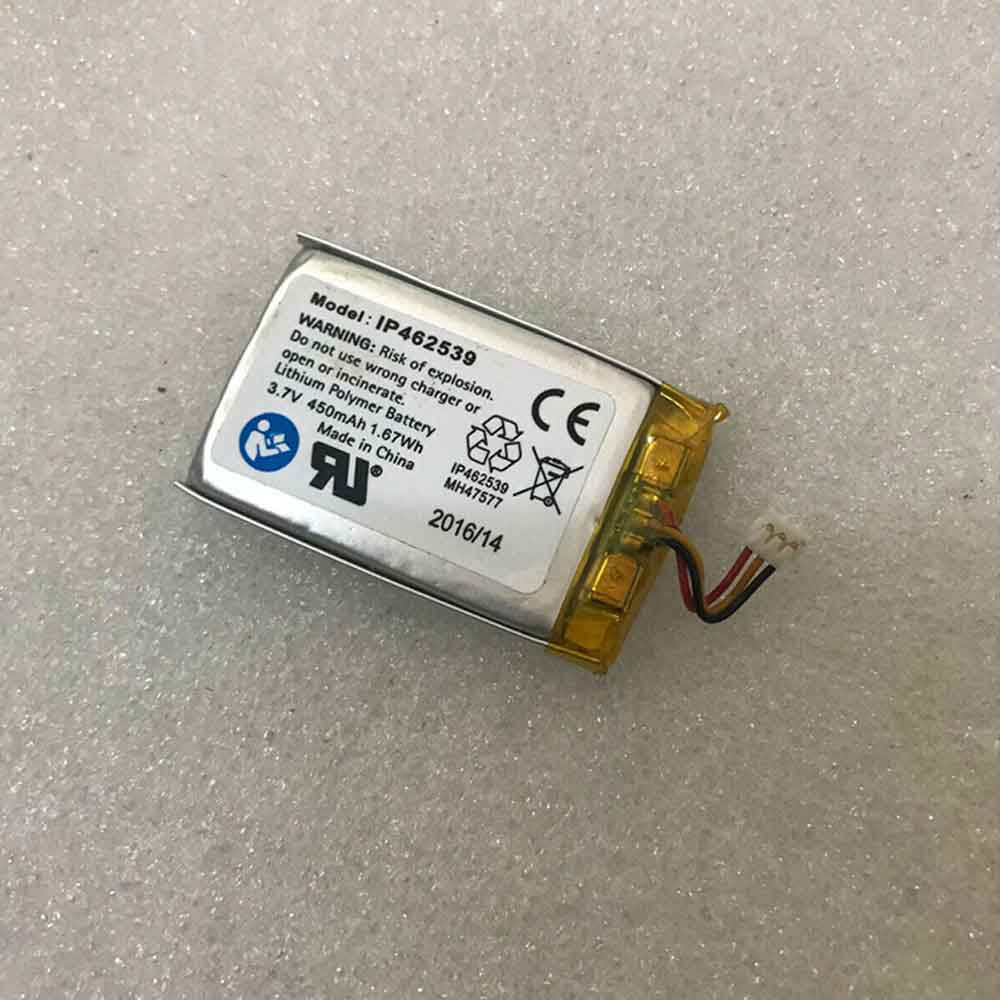 Product SpecificationsBrand: Phonak Medical BatteryBattery Type: Lithium PolymerBattery Voltage: 3.7VBattery Capacity: 450mAhWarranty: 30 Days Money Back, 1 Year Warranty.Over 500-800 times of charge and discharge.Compatible Part Numbers:
Compatible Models:for Phonak ComPilotfor Phonak ComPilot IIAs a professional manufacturer, we offer a 100% brand new Lithium Polymer battery for Phonak IP462539, built with genuine Grade A cells to ensure high quality and stable performance. Certified by CE, ROHS, and MSDS, this battery delivers excellent discharge characteristics and supports over 500–800 charge cycles.It is fully compatible with original Fujitsu equipment and features multiple built-in protections including over-charge, over-current, over-voltage, and short-circuit prevention. Designed with an advanced printed circuit board (PCB), it provides reliable and safe operation.Backed by a one-year warranty, 30-day money-back guarantee, and 100% secure shopping assurance, we provide premium performance at a competitive price.To ensure optimal performance and longevity of your Phonak IP462539 Battery, please adhere to the following guidelines:1.Storage - Store the battery IP462539 in a clean, dry, and cool environment, away from heat sources and metal objects. During storage, the battery will gradually self-discharge. It is recommended to store it at approximately 40% state of charge.2.Charging and Discharging - Unlike older battery technologies, lithium-ion batteries do not require frequent full discharge cycles. Only perform a full discharge approximately every 30 charging cycles. Avoid charging the battery beyond its specified threshold voltage.3.Regular Use - Avoid leaving the battery IP462539 idle for extended periods. It is advisable to use the battery at least once every two to three weeks. If the battery has been unused for a long time, follow the initial break-in procedure as recommended for new batteries.4.Calibration - If the battery indicator shows 76% or less during use, fully charge it, then fully discharge it, and finally recharge it completely to calibrate the battery level accuracy.5.Usage on Fixed Power - Consider removing the battery from the laptop when using a fixed power source for extended periods to reduce unnecessary charging cycles.6.Short-Circuit Prevention - Do not short-circuit the battery, as this can cause serious damage and compromise safety.By following these practices, you can help maintain the performance and extend the life of your Phonak IP462539 Battery.
Product SpecificationsBrand: Phonak Medical BatteryBattery Type: Lithium PolymerBattery Voltage: 3.7VBattery Capacity: 450mAhWarranty: 30 Days Money Back, 1 Year Warranty.Over 500-800 times of charge and discharge.Compatible Part Numbers:
Compatible Models:for Phonak ComPilotfor Phonak ComPilot IIAs a professional manufacturer, we offer a 100% brand new Lithium Polymer battery for Phonak IP462539, built with genuine Grade A cells to ensure high quality and stable performance. Certified by CE, ROHS, and MSDS, this battery delivers excellent discharge characteristics and supports over 500–800 charge cycles.It is fully compatible with original Fujitsu equipment and features multiple built-in protections including over-charge, over-current, over-voltage, and short-circuit prevention. Designed with an advanced printed circuit board (PCB), it provides reliable and safe operation.Backed by a one-year warranty, 30-day money-back guarantee, and 100% secure shopping assurance, we provide premium performance at a competitive price.To ensure optimal performance and longevity of your Phonak IP462539 Battery, please adhere to the following guidelines:1.Storage - Store the battery IP462539 in a clean, dry, and cool environment, away from heat sources and metal objects. During storage, the battery will gradually self-discharge. It is recommended to store it at approximately 40% state of charge.2.Charging and Discharging - Unlike older battery technologies, lithium-ion batteries do not require frequent full discharge cycles. Only perform a full discharge approximately every 30 charging cycles. Avoid charging the battery beyond its specified threshold voltage.3.Regular Use - Avoid leaving the battery IP462539 idle for extended periods. It is advisable to use the battery at least once every two to three weeks. If the battery has been unused for a long time, follow the initial break-in procedure as recommended for new batteries.4.Calibration - If the battery indicator shows 76% or less during use, fully charge it, then fully discharge it, and finally recharge it completely to calibrate the battery level accuracy.5.Usage on Fixed Power - Consider removing the battery from the laptop when using a fixed power source for extended periods to reduce unnecessary charging cycles.6.Short-Circuit Prevention - Do not short-circuit the battery, as this can cause serious damage and compromise safety.By following these practices, you can help maintain the performance and extend the life of your Phonak IP462539 Battery.
-
48W DA-48T12 AC Adapter for APD DA-48T12
This 100% brand-new Other DA-48T12 AC Adapter is engineered for long-lasting, stable performance and is fully compatible with the APD DA-48T12. It comes with a one-year warranty, fast shipping, and dedicated after-sales support.As a trusted supplier, we offer 48W replacement AC Adapter for Other DA-48T12 at competitive prices, with fast worldwide delivery and free shipping.Get the best deals on Other DA-48T12 replacement AC Adapter — your ideal source for premium laptop power solutions delivered globally.
48W DA-48T12 AC Adapter for APD DA-48T12
 Brand: Other AC AdapterOutput Voltage: 12.0V 4.0A 48.0W (ref to the picture)Output Current: 100-240V 50-60Hz 1.4A Max (for worldwide use)Power: 48WSize:5.5*2.1mm(ref to the picture)Compatible Part Numbers:DA-48T12, CW-01 F3Compatible Models:for APD DA-48T12Other DA-48T12 AC AdapterTips1.Keep your Other DA-48T12 AC Adapter in a dry place with room temperature. Just like other electronic devices, adapter can get damage cause by high temperature.2. Don't shake or knock the Other DA-48T12 AC Adapter.Improper handling may break the internal parts and circuit boards.3.Avoid the metal tip of the adapter from getting in contact with other metal objects because it can cause short-circuiting. Your laptop might get damage when a short-circuited charger is used.4. Don't place the Other DA-48T12 AC Adapter in a cool place or near the air conditioner to avoid the device from getting moistened.5.keep water away from inside the Other DA-48T12 AC Adapter. If it is fallen into water or flooded in water, that will get into the inside of it and the adapter may not work as usual because the inside part is damaged and the electricity cann't be connected to the laptop well.6.There's nothing worse than having a low battery and finding out your Laptop Adapter suddenly isn't working. Keep an extra Other DA-48T12 AC Adapter on hand. If you tend to travel, keep your second charger close but in a separate location from the one you usually use. If one charger comes up missing, you'll still have a backup.
-
4700mAh CP405050-P2 Replacement Battery for Hikvision DS-PDP-EX-ES1 DS-PD2-T10P
Our brand-new Network Cameras Battery compatible with Hikvision CP405050-P2 is engineered to deliver long-lasting and stable performance. It is designed to meet rigorous standards, ensuring full compatibility with devices such as the Hikvision DS-PDP-EX-ES1 DS-PD2-T10P. This battery comes with a one-year warranty and has passed essential safety certifications including CE, RoHS, and ISO9001. Choose our Hikvision CP405050-P2 battery for a power solution that combines quality, safety, and convenience. Invest in authentic performance and keep your Hikvision DS-PDP-EX-ES1 DS-PD2-T10P running like new.
4700mAh CP405050-P2 Replacement Battery for Hikvision DS-PDP-EX-ES1 DS-PD2-T10P
.jpg) Product SpecificationsBrand: Hikvision Network Cameras BatteryBattery Type: LiMnO2Battery Voltage: 3VBattery Capacity: 4700mAhWarranty: 30 Days Money Back, 1 Year Warranty.Over 500-800 times of charge and discharge.Compatible Part Numbers:
Compatible Models:for Hikvision DS-PDP-EX-ES1 DS-PD2-T10PAs a professional manufacturer, we offer a 100% brand new LiMnO2 battery for Hikvision CP405050-P2, built with genuine Grade A cells to ensure high quality and stable performance. Certified by CE, ROHS, and MSDS, this battery delivers excellent discharge characteristics and supports over 500–800 charge cycles.It is fully compatible with original Fujitsu equipment and features multiple built-in protections including over-charge, over-current, over-voltage, and short-circuit prevention. Designed with an advanced printed circuit board (PCB), it provides reliable and safe operation.Backed by a one-year warranty, 30-day money-back guarantee, and 100% secure shopping assurance, we provide premium performance at a competitive price.To ensure optimal performance and longevity of your Hikvision CP405050-P2 Battery, please adhere to the following guidelines:1.Storage - Store the battery CP405050-P2 in a clean, dry, and cool environment, away from heat sources and metal objects. During storage, the battery will gradually self-discharge. It is recommended to store it at approximately 40% state of charge.2.Charging and Discharging - Unlike older battery technologies, lithium-ion batteries do not require frequent full discharge cycles. Only perform a full discharge approximately every 30 charging cycles. Avoid charging the battery beyond its specified threshold voltage.3.Regular Use - Avoid leaving the battery CP405050-P2 idle for extended periods. It is advisable to use the battery at least once every two to three weeks. If the battery has been unused for a long time, follow the initial break-in procedure as recommended for new batteries.4.Calibration - If the battery indicator shows 76% or less during use, fully charge it, then fully discharge it, and finally recharge it completely to calibrate the battery level accuracy.5.Usage on Fixed Power - Consider removing the battery from the laptop when using a fixed power source for extended periods to reduce unnecessary charging cycles.6.Short-Circuit Prevention - Do not short-circuit the battery, as this can cause serious damage and compromise safety.By following these practices, you can help maintain the performance and extend the life of your Hikvision CP405050-P2 Battery.
Product SpecificationsBrand: Hikvision Network Cameras BatteryBattery Type: LiMnO2Battery Voltage: 3VBattery Capacity: 4700mAhWarranty: 30 Days Money Back, 1 Year Warranty.Over 500-800 times of charge and discharge.Compatible Part Numbers:
Compatible Models:for Hikvision DS-PDP-EX-ES1 DS-PD2-T10PAs a professional manufacturer, we offer a 100% brand new LiMnO2 battery for Hikvision CP405050-P2, built with genuine Grade A cells to ensure high quality and stable performance. Certified by CE, ROHS, and MSDS, this battery delivers excellent discharge characteristics and supports over 500–800 charge cycles.It is fully compatible with original Fujitsu equipment and features multiple built-in protections including over-charge, over-current, over-voltage, and short-circuit prevention. Designed with an advanced printed circuit board (PCB), it provides reliable and safe operation.Backed by a one-year warranty, 30-day money-back guarantee, and 100% secure shopping assurance, we provide premium performance at a competitive price.To ensure optimal performance and longevity of your Hikvision CP405050-P2 Battery, please adhere to the following guidelines:1.Storage - Store the battery CP405050-P2 in a clean, dry, and cool environment, away from heat sources and metal objects. During storage, the battery will gradually self-discharge. It is recommended to store it at approximately 40% state of charge.2.Charging and Discharging - Unlike older battery technologies, lithium-ion batteries do not require frequent full discharge cycles. Only perform a full discharge approximately every 30 charging cycles. Avoid charging the battery beyond its specified threshold voltage.3.Regular Use - Avoid leaving the battery CP405050-P2 idle for extended periods. It is advisable to use the battery at least once every two to three weeks. If the battery has been unused for a long time, follow the initial break-in procedure as recommended for new batteries.4.Calibration - If the battery indicator shows 76% or less during use, fully charge it, then fully discharge it, and finally recharge it completely to calibrate the battery level accuracy.5.Usage on Fixed Power - Consider removing the battery from the laptop when using a fixed power source for extended periods to reduce unnecessary charging cycles.6.Short-Circuit Prevention - Do not short-circuit the battery, as this can cause serious damage and compromise safety.By following these practices, you can help maintain the performance and extend the life of your Hikvision CP405050-P2 Battery.
-
5150mAh YW-008 Replacement Battery for Veken A920ProPosS
Our brand-new Consumer Electronics Battery compatible with Veken YW-008 is engineered to deliver long-lasting and stable performance. It is designed to meet rigorous standards, ensuring full compatibility with devices such as the Veken A920ProPosS. This battery comes with a one-year warranty and has passed essential safety certifications including CE, RoHS, and ISO9001. Choose our Veken YW-008 battery for a power solution that combines quality, safety, and convenience. Invest in authentic performance and keep your Veken A920ProPosS running like new.
5150mAh YW-008 Replacement Battery for Veken A920ProPosS
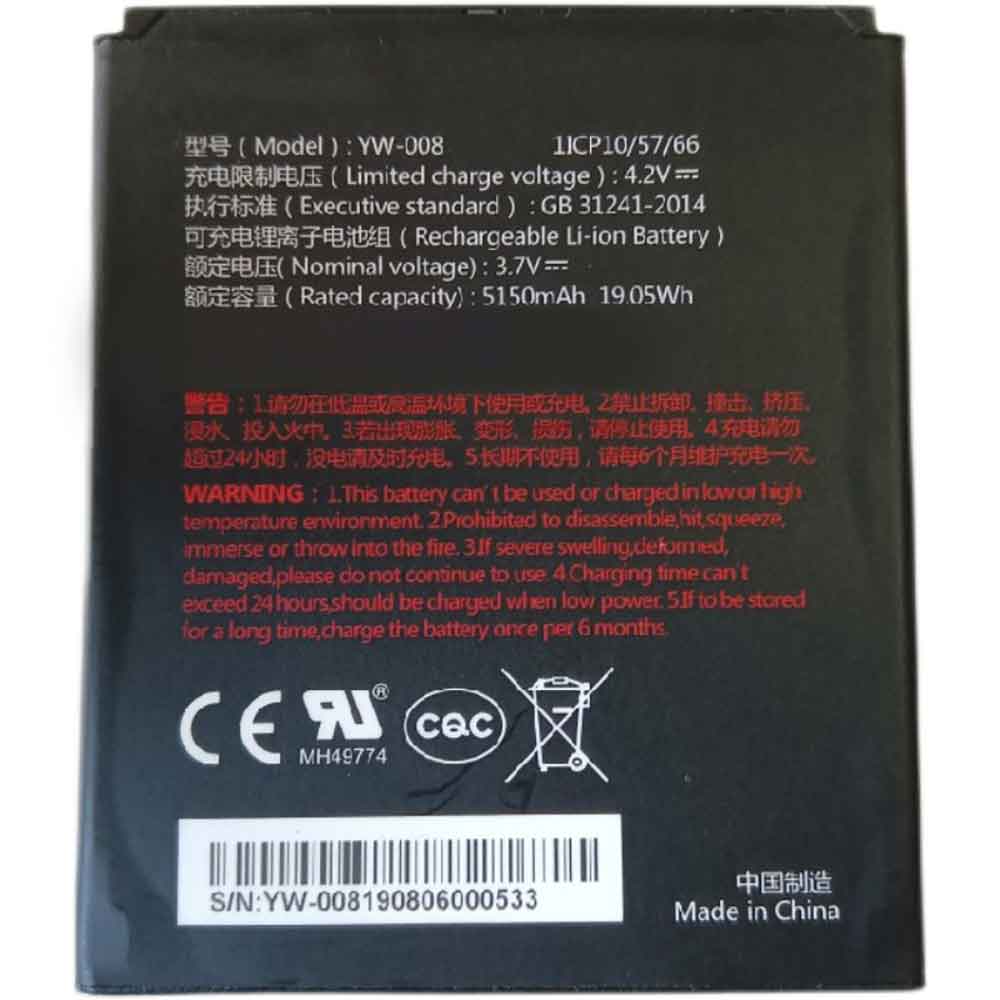 Product SpecificationsBrand: Veken Consumer Electronics BatteryBattery Type: Li-ionBattery Voltage: 3.7VBattery Capacity: 5150mAhWarranty: 30 Days Money Back, 1 Year Warranty.Over 500-800 times of charge and discharge.Compatible Part Numbers:
Compatible Models:Veken A920ProPosSAs a professional manufacturer, we offer a 100% brand new Li-ion battery for Veken YW-008, built with genuine Grade A cells to ensure high quality and stable performance. Certified by CE, ROHS, and MSDS, this battery delivers excellent discharge characteristics and supports over 500–800 charge cycles.It is fully compatible with original Fujitsu equipment and features multiple built-in protections including over-charge, over-current, over-voltage, and short-circuit prevention. Designed with an advanced printed circuit board (PCB), it provides reliable and safe operation.Backed by a one-year warranty, 30-day money-back guarantee, and 100% secure shopping assurance, we provide premium performance at a competitive price.To ensure optimal performance and longevity of your Veken YW-008 Battery, please adhere to the following guidelines:1.Storage - Store the battery YW-008 in a clean, dry, and cool environment, away from heat sources and metal objects. During storage, the battery will gradually self-discharge. It is recommended to store it at approximately 40% state of charge.2.Charging and Discharging - Unlike older battery technologies, lithium-ion batteries do not require frequent full discharge cycles. Only perform a full discharge approximately every 30 charging cycles. Avoid charging the battery beyond its specified threshold voltage.3.Regular Use - Avoid leaving the battery YW-008 idle for extended periods. It is advisable to use the battery at least once every two to three weeks. If the battery has been unused for a long time, follow the initial break-in procedure as recommended for new batteries.4.Calibration - If the battery indicator shows 76% or less during use, fully charge it, then fully discharge it, and finally recharge it completely to calibrate the battery level accuracy.5.Usage on Fixed Power - Consider removing the battery from the laptop when using a fixed power source for extended periods to reduce unnecessary charging cycles.6.Short-Circuit Prevention - Do not short-circuit the battery, as this can cause serious damage and compromise safety.By following these practices, you can help maintain the performance and extend the life of your Veken YW-008 Battery.
Product SpecificationsBrand: Veken Consumer Electronics BatteryBattery Type: Li-ionBattery Voltage: 3.7VBattery Capacity: 5150mAhWarranty: 30 Days Money Back, 1 Year Warranty.Over 500-800 times of charge and discharge.Compatible Part Numbers:
Compatible Models:Veken A920ProPosSAs a professional manufacturer, we offer a 100% brand new Li-ion battery for Veken YW-008, built with genuine Grade A cells to ensure high quality and stable performance. Certified by CE, ROHS, and MSDS, this battery delivers excellent discharge characteristics and supports over 500–800 charge cycles.It is fully compatible with original Fujitsu equipment and features multiple built-in protections including over-charge, over-current, over-voltage, and short-circuit prevention. Designed with an advanced printed circuit board (PCB), it provides reliable and safe operation.Backed by a one-year warranty, 30-day money-back guarantee, and 100% secure shopping assurance, we provide premium performance at a competitive price.To ensure optimal performance and longevity of your Veken YW-008 Battery, please adhere to the following guidelines:1.Storage - Store the battery YW-008 in a clean, dry, and cool environment, away from heat sources and metal objects. During storage, the battery will gradually self-discharge. It is recommended to store it at approximately 40% state of charge.2.Charging and Discharging - Unlike older battery technologies, lithium-ion batteries do not require frequent full discharge cycles. Only perform a full discharge approximately every 30 charging cycles. Avoid charging the battery beyond its specified threshold voltage.3.Regular Use - Avoid leaving the battery YW-008 idle for extended periods. It is advisable to use the battery at least once every two to three weeks. If the battery has been unused for a long time, follow the initial break-in procedure as recommended for new batteries.4.Calibration - If the battery indicator shows 76% or less during use, fully charge it, then fully discharge it, and finally recharge it completely to calibrate the battery level accuracy.5.Usage on Fixed Power - Consider removing the battery from the laptop when using a fixed power source for extended periods to reduce unnecessary charging cycles.6.Short-Circuit Prevention - Do not short-circuit the battery, as this can cause serious damage and compromise safety.By following these practices, you can help maintain the performance and extend the life of your Veken YW-008 Battery.
最新記事
(09/04)
(09/04)
(09/04)
(09/04)
(09/03)