
-
50W AC-509C AC Adapter for Sony AC-509C Power supply
This 100% brand-new Sony AC-509C AC Adapter is engineered for long-lasting, stable performance and is fully compatible with the Sony AC-509C Power supply. It comes with a one-year warranty, fast shipping, and dedicated after-sales support.As a trusted supplier, we offer 50W replacement AC Adapter for Sony AC-509C at competitive prices, with fast worldwide delivery and free shipping.Get the best deals on Sony AC-509C replacement AC Adapter — your ideal source for premium laptop power solutions delivered globally.
50W AC-509C AC Adapter for Sony AC-509C Power supply
 Brand: Sony AC AdapterOutput Voltage: 25V 2A 50WOutput Current: 100-240V 50-60Hz 1.6APower: 50WSize:5.5*2.1mmCompatible Part Numbers:AC-509CCompatible Models:for Sony AC-509C Power supplySony AC-509C AC AdapterTips1.Keep your Sony AC-509C AC Adapter in a dry place with room temperature. Just like other electronic devices, adapter can get damage cause by high temperature.2. Don't shake or knock the Sony AC-509C AC Adapter.Improper handling may break the internal parts and circuit boards.3.Avoid the metal tip of the adapter from getting in contact with other metal objects because it can cause short-circuiting. Your laptop might get damage when a short-circuited charger is used.4. Don't place the Sony AC-509C AC Adapter in a cool place or near the air conditioner to avoid the device from getting moistened.5.keep water away from inside the Sony AC-509C AC Adapter. If it is fallen into water or flooded in water, that will get into the inside of it and the adapter may not work as usual because the inside part is damaged and the electricity cann't be connected to the laptop well.6.There's nothing worse than having a low battery and finding out your Laptop Adapter suddenly isn't working. Keep an extra Sony AC-509C AC Adapter on hand. If you tend to travel, keep your second charger close but in a separate location from the one you usually use. If one charger comes up missing, you'll still have a backup.
PR
-
7350mAh U80221-4 Replacement Battery for Philips PageWriter TC50 Cardiograph
Our brand-new Medical Battery compatible with Philips U80221-4 is engineered to deliver long-lasting and stable performance. It is designed to meet rigorous standards, ensuring full compatibility with devices such as the Philips PageWriter TC50 Cardiograph. This battery comes with a one-year warranty and has passed essential safety certifications including CE, RoHS, and ISO9001. Choose our Philips U80221-4 battery for a power solution that combines quality, safety, and convenience. Invest in authentic performance and keep your Philips PageWriter TC50 Cardiograph running like new.
7350mAh U80221-4 Replacement Battery for Philips PageWriter TC50 Cardiograph
 Product SpecificationsBrand: Philips Medical BatteryBattery Type: Li-ionBattery Voltage: 11.1VBattery Capacity: 7350mAhWarranty: 30 Days Money Back, 1 Year Warranty.Over 500-800 times of charge and discharge.Compatible Part Numbers:
Compatible Models:for Philips 860310 and 860429 PageWriter TC50 CardiographNote: Not?Compatible?TC20 TC30?TC40 TC70Not?Compatible863359 EarlyVue VS30 Vital Signs Monitor (Made in China)Not?Compatible863380 EarlyVue VS30 Vital Signs Monitor (Made in Germany)Not?Compatible860306 PageWriter TC30 CardiographNot?Compatible860332 PageWriter TC20 CardiographNot?Compatible860315 and 860352 PageWriter TC70 CardiographNot suitable for SureSigns VM6, VM8, VSNote: TC20?TC30 TC40 TC50 TC70 These models correspond to the same battery model, and the program for each model is different. When purchasing, please match the model accordingly. Our company will modify the program for the corresponding model of the battery before use. Please take a picture of the corresponding model instead of the battery model. Thank you for your cooperation!As a professional manufacturer, we offer a 100% brand new Li-ion battery for Philips U80221-4, built with genuine Grade A cells to ensure high quality and stable performance. Certified by CE, ROHS, and MSDS, this battery delivers excellent discharge characteristics and supports over 500–800 charge cycles.It is fully compatible with original Fujitsu equipment and features multiple built-in protections including over-charge, over-current, over-voltage, and short-circuit prevention. Designed with an advanced printed circuit board (PCB), it provides reliable and safe operation.Backed by a one-year warranty, 30-day money-back guarantee, and 100% secure shopping assurance, we provide premium performance at a competitive price.To ensure optimal performance and longevity of your Philips U80221-4 Battery, please adhere to the following guidelines:1.Storage - Store the battery U80221-4 in a clean, dry, and cool environment, away from heat sources and metal objects. During storage, the battery will gradually self-discharge. It is recommended to store it at approximately 40% state of charge.2.Charging and Discharging - Unlike older battery technologies, lithium-ion batteries do not require frequent full discharge cycles. Only perform a full discharge approximately every 30 charging cycles. Avoid charging the battery beyond its specified threshold voltage.3.Regular Use - Avoid leaving the battery U80221-4 idle for extended periods. It is advisable to use the battery at least once every two to three weeks. If the battery has been unused for a long time, follow the initial break-in procedure as recommended for new batteries.4.Calibration - If the battery indicator shows 76% or less during use, fully charge it, then fully discharge it, and finally recharge it completely to calibrate the battery level accuracy.5.Usage on Fixed Power - Consider removing the battery from the laptop when using a fixed power source for extended periods to reduce unnecessary charging cycles.6.Short-Circuit Prevention - Do not short-circuit the battery, as this can cause serious damage and compromise safety.By following these practices, you can help maintain the performance and extend the life of your Philips U80221-4 Battery.
Product SpecificationsBrand: Philips Medical BatteryBattery Type: Li-ionBattery Voltage: 11.1VBattery Capacity: 7350mAhWarranty: 30 Days Money Back, 1 Year Warranty.Over 500-800 times of charge and discharge.Compatible Part Numbers:
Compatible Models:for Philips 860310 and 860429 PageWriter TC50 CardiographNote: Not?Compatible?TC20 TC30?TC40 TC70Not?Compatible863359 EarlyVue VS30 Vital Signs Monitor (Made in China)Not?Compatible863380 EarlyVue VS30 Vital Signs Monitor (Made in Germany)Not?Compatible860306 PageWriter TC30 CardiographNot?Compatible860332 PageWriter TC20 CardiographNot?Compatible860315 and 860352 PageWriter TC70 CardiographNot suitable for SureSigns VM6, VM8, VSNote: TC20?TC30 TC40 TC50 TC70 These models correspond to the same battery model, and the program for each model is different. When purchasing, please match the model accordingly. Our company will modify the program for the corresponding model of the battery before use. Please take a picture of the corresponding model instead of the battery model. Thank you for your cooperation!As a professional manufacturer, we offer a 100% brand new Li-ion battery for Philips U80221-4, built with genuine Grade A cells to ensure high quality and stable performance. Certified by CE, ROHS, and MSDS, this battery delivers excellent discharge characteristics and supports over 500–800 charge cycles.It is fully compatible with original Fujitsu equipment and features multiple built-in protections including over-charge, over-current, over-voltage, and short-circuit prevention. Designed with an advanced printed circuit board (PCB), it provides reliable and safe operation.Backed by a one-year warranty, 30-day money-back guarantee, and 100% secure shopping assurance, we provide premium performance at a competitive price.To ensure optimal performance and longevity of your Philips U80221-4 Battery, please adhere to the following guidelines:1.Storage - Store the battery U80221-4 in a clean, dry, and cool environment, away from heat sources and metal objects. During storage, the battery will gradually self-discharge. It is recommended to store it at approximately 40% state of charge.2.Charging and Discharging - Unlike older battery technologies, lithium-ion batteries do not require frequent full discharge cycles. Only perform a full discharge approximately every 30 charging cycles. Avoid charging the battery beyond its specified threshold voltage.3.Regular Use - Avoid leaving the battery U80221-4 idle for extended periods. It is advisable to use the battery at least once every two to three weeks. If the battery has been unused for a long time, follow the initial break-in procedure as recommended for new batteries.4.Calibration - If the battery indicator shows 76% or less during use, fully charge it, then fully discharge it, and finally recharge it completely to calibrate the battery level accuracy.5.Usage on Fixed Power - Consider removing the battery from the laptop when using a fixed power source for extended periods to reduce unnecessary charging cycles.6.Short-Circuit Prevention - Do not short-circuit the battery, as this can cause serious damage and compromise safety.By following these practices, you can help maintain the performance and extend the life of your Philips U80221-4 Battery.
-
4400mAh/32.6WH SSBS49 Replacement Battery for Haier Y13A Y13B
Our brand-new Laptop Battery compatible with Haier SSBS49 is engineered to deliver long-lasting and stable performance. It is designed to meet rigorous standards, ensuring full compatibility with devices such as the Haier Y13A Y13B. This battery comes with a one-year warranty and has passed essential safety certifications including CE, RoHS, and ISO9001. Choose our Haier SSBS49 battery for a power solution that combines quality, safety, and convenience. Invest in authentic performance and keep your Haier Y13A Y13B running like new.
4400mAh/32.6WH SSBS49 Replacement Battery for Haier Y13A Y13B
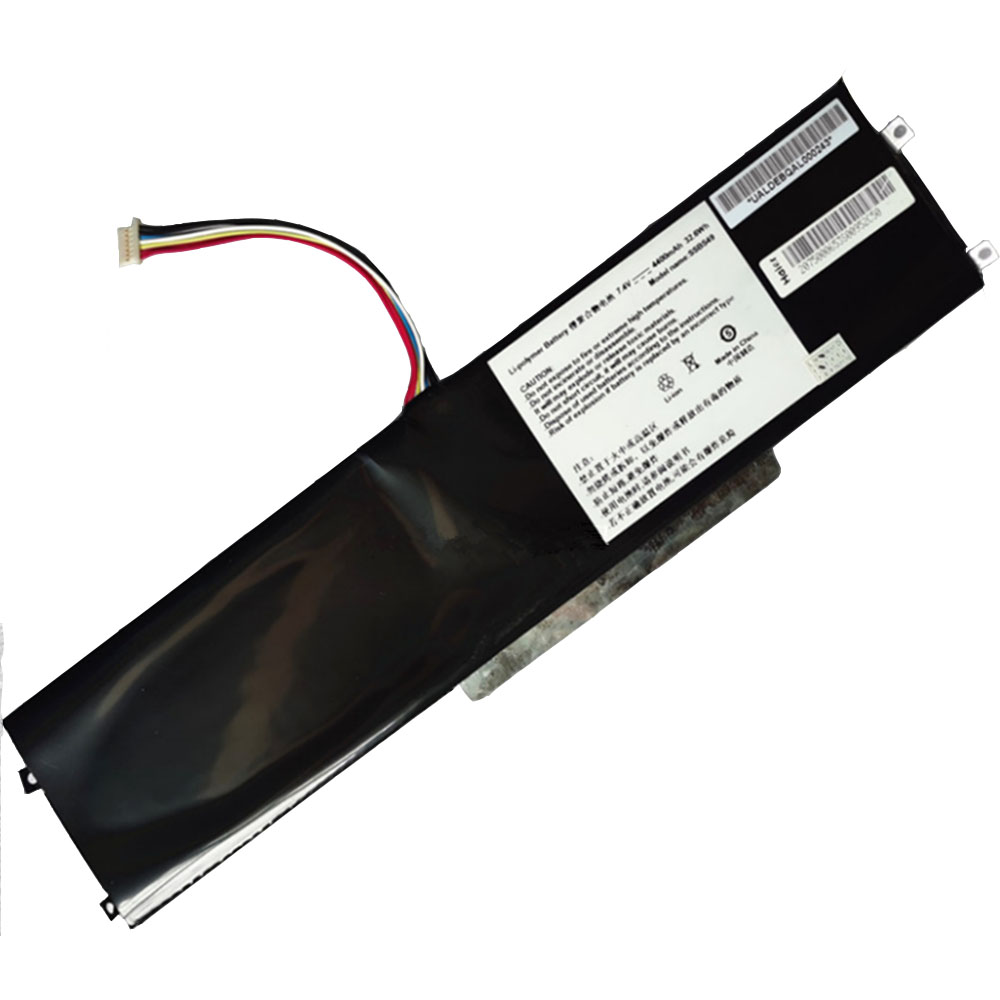 Product SpecificationsBrand: Haier Laptop BatteryBattery Type: Li-ionBattery Voltage: 7.4V/8.4VBattery Capacity: 4400mAh/32.6WHWarranty: 30 Days Money Back, 1 Year Warranty.Over 500-800 times of charge and discharge.Compatible Part Numbers:
Compatible Models:Haier Y13A Y13BAs a professional manufacturer, we offer a 100% brand new Li-ion battery for Haier SSBS49, built with genuine Grade A cells to ensure high quality and stable performance. Certified by CE, ROHS, and MSDS, this battery delivers excellent discharge characteristics and supports over 500–800 charge cycles.It is fully compatible with original Fujitsu equipment and features multiple built-in protections including over-charge, over-current, over-voltage, and short-circuit prevention. Designed with an advanced printed circuit board (PCB), it provides reliable and safe operation.Backed by a one-year warranty, 30-day money-back guarantee, and 100% secure shopping assurance, we provide premium performance at a competitive price.To ensure optimal performance and longevity of your Haier SSBS49 Battery, please adhere to the following guidelines:1.Storage - Store the battery SSBS49 in a clean, dry, and cool environment, away from heat sources and metal objects. During storage, the battery will gradually self-discharge. It is recommended to store it at approximately 40% state of charge.2.Charging and Discharging - Unlike older battery technologies, lithium-ion batteries do not require frequent full discharge cycles. Only perform a full discharge approximately every 30 charging cycles. Avoid charging the battery beyond its specified threshold voltage.3.Regular Use - Avoid leaving the battery SSBS49 idle for extended periods. It is advisable to use the battery at least once every two to three weeks. If the battery has been unused for a long time, follow the initial break-in procedure as recommended for new batteries.4.Calibration - If the battery indicator shows 76% or less during use, fully charge it, then fully discharge it, and finally recharge it completely to calibrate the battery level accuracy.5.Usage on Fixed Power - Consider removing the battery from the laptop when using a fixed power source for extended periods to reduce unnecessary charging cycles.6.Short-Circuit Prevention - Do not short-circuit the battery, as this can cause serious damage and compromise safety.By following these practices, you can help maintain the performance and extend the life of your Haier SSBS49 Battery.
Product SpecificationsBrand: Haier Laptop BatteryBattery Type: Li-ionBattery Voltage: 7.4V/8.4VBattery Capacity: 4400mAh/32.6WHWarranty: 30 Days Money Back, 1 Year Warranty.Over 500-800 times of charge and discharge.Compatible Part Numbers:
Compatible Models:Haier Y13A Y13BAs a professional manufacturer, we offer a 100% brand new Li-ion battery for Haier SSBS49, built with genuine Grade A cells to ensure high quality and stable performance. Certified by CE, ROHS, and MSDS, this battery delivers excellent discharge characteristics and supports over 500–800 charge cycles.It is fully compatible with original Fujitsu equipment and features multiple built-in protections including over-charge, over-current, over-voltage, and short-circuit prevention. Designed with an advanced printed circuit board (PCB), it provides reliable and safe operation.Backed by a one-year warranty, 30-day money-back guarantee, and 100% secure shopping assurance, we provide premium performance at a competitive price.To ensure optimal performance and longevity of your Haier SSBS49 Battery, please adhere to the following guidelines:1.Storage - Store the battery SSBS49 in a clean, dry, and cool environment, away from heat sources and metal objects. During storage, the battery will gradually self-discharge. It is recommended to store it at approximately 40% state of charge.2.Charging and Discharging - Unlike older battery technologies, lithium-ion batteries do not require frequent full discharge cycles. Only perform a full discharge approximately every 30 charging cycles. Avoid charging the battery beyond its specified threshold voltage.3.Regular Use - Avoid leaving the battery SSBS49 idle for extended periods. It is advisable to use the battery at least once every two to three weeks. If the battery has been unused for a long time, follow the initial break-in procedure as recommended for new batteries.4.Calibration - If the battery indicator shows 76% or less during use, fully charge it, then fully discharge it, and finally recharge it completely to calibrate the battery level accuracy.5.Usage on Fixed Power - Consider removing the battery from the laptop when using a fixed power source for extended periods to reduce unnecessary charging cycles.6.Short-Circuit Prevention - Do not short-circuit the battery, as this can cause serious damage and compromise safety.By following these practices, you can help maintain the performance and extend the life of your Haier SSBS49 Battery.
-
6300mAh PC944755-2S2P Replacement Battery for Launch Topdon phoenix plus
Our brand-new Power Tool Battery compatible with Launch PC944755-2S2P is engineered to deliver long-lasting and stable performance. It is designed to meet rigorous standards, ensuring full compatibility with devices such as the Launch Topdon phoenix plus. This battery comes with a one-year warranty and has passed essential safety certifications including CE, RoHS, and ISO9001. Choose our Launch PC944755-2S2P battery for a power solution that combines quality, safety, and convenience. Invest in authentic performance and keep your Launch Topdon phoenix plus running like new.
6300mAh PC944755-2S2P Replacement Battery for Launch Topdon phoenix plus
 Product SpecificationsBrand: Launch Power Tool BatteryBattery Type: Li-ionBattery Voltage: 7.6VBattery Capacity: 6300mAhWarranty: 30 Days Money Back, 1 Year Warranty.Over 500-800 times of charge and discharge.Compatible Part Numbers:
Compatible Models:for Launch Topdon phoenix plusAs a professional manufacturer, we offer a 100% brand new Li-ion battery for Launch PC944755-2S2P, built with genuine Grade A cells to ensure high quality and stable performance. Certified by CE, ROHS, and MSDS, this battery delivers excellent discharge characteristics and supports over 500–800 charge cycles.It is fully compatible with original Fujitsu equipment and features multiple built-in protections including over-charge, over-current, over-voltage, and short-circuit prevention. Designed with an advanced printed circuit board (PCB), it provides reliable and safe operation.Backed by a one-year warranty, 30-day money-back guarantee, and 100% secure shopping assurance, we provide premium performance at a competitive price.To ensure optimal performance and longevity of your Launch PC944755-2S2P Battery, please adhere to the following guidelines:1.Storage - Store the battery PC944755-2S2P in a clean, dry, and cool environment, away from heat sources and metal objects. During storage, the battery will gradually self-discharge. It is recommended to store it at approximately 40% state of charge.2.Charging and Discharging - Unlike older battery technologies, lithium-ion batteries do not require frequent full discharge cycles. Only perform a full discharge approximately every 30 charging cycles. Avoid charging the battery beyond its specified threshold voltage.3.Regular Use - Avoid leaving the battery PC944755-2S2P idle for extended periods. It is advisable to use the battery at least once every two to three weeks. If the battery has been unused for a long time, follow the initial break-in procedure as recommended for new batteries.4.Calibration - If the battery indicator shows 76% or less during use, fully charge it, then fully discharge it, and finally recharge it completely to calibrate the battery level accuracy.5.Usage on Fixed Power - Consider removing the battery from the laptop when using a fixed power source for extended periods to reduce unnecessary charging cycles.6.Short-Circuit Prevention - Do not short-circuit the battery, as this can cause serious damage and compromise safety.By following these practices, you can help maintain the performance and extend the life of your Launch PC944755-2S2P Battery.
Product SpecificationsBrand: Launch Power Tool BatteryBattery Type: Li-ionBattery Voltage: 7.6VBattery Capacity: 6300mAhWarranty: 30 Days Money Back, 1 Year Warranty.Over 500-800 times of charge and discharge.Compatible Part Numbers:
Compatible Models:for Launch Topdon phoenix plusAs a professional manufacturer, we offer a 100% brand new Li-ion battery for Launch PC944755-2S2P, built with genuine Grade A cells to ensure high quality and stable performance. Certified by CE, ROHS, and MSDS, this battery delivers excellent discharge characteristics and supports over 500–800 charge cycles.It is fully compatible with original Fujitsu equipment and features multiple built-in protections including over-charge, over-current, over-voltage, and short-circuit prevention. Designed with an advanced printed circuit board (PCB), it provides reliable and safe operation.Backed by a one-year warranty, 30-day money-back guarantee, and 100% secure shopping assurance, we provide premium performance at a competitive price.To ensure optimal performance and longevity of your Launch PC944755-2S2P Battery, please adhere to the following guidelines:1.Storage - Store the battery PC944755-2S2P in a clean, dry, and cool environment, away from heat sources and metal objects. During storage, the battery will gradually self-discharge. It is recommended to store it at approximately 40% state of charge.2.Charging and Discharging - Unlike older battery technologies, lithium-ion batteries do not require frequent full discharge cycles. Only perform a full discharge approximately every 30 charging cycles. Avoid charging the battery beyond its specified threshold voltage.3.Regular Use - Avoid leaving the battery PC944755-2S2P idle for extended periods. It is advisable to use the battery at least once every two to three weeks. If the battery has been unused for a long time, follow the initial break-in procedure as recommended for new batteries.4.Calibration - If the battery indicator shows 76% or less during use, fully charge it, then fully discharge it, and finally recharge it completely to calibrate the battery level accuracy.5.Usage on Fixed Power - Consider removing the battery from the laptop when using a fixed power source for extended periods to reduce unnecessary charging cycles.6.Short-Circuit Prevention - Do not short-circuit the battery, as this can cause serious damage and compromise safety.By following these practices, you can help maintain the performance and extend the life of your Launch PC944755-2S2P Battery.
-
5000mAh W3-S-S Replacement Battery for Samsung Galaxy A16 5G
Our brand-new Smartphone Battery compatible with Samsung W3-S-S is engineered to deliver long-lasting and stable performance. It is designed to meet rigorous standards, ensuring full compatibility with devices such as the Samsung Galaxy A16 5G. This battery comes with a one-year warranty and has passed essential safety certifications including CE, RoHS, and ISO9001. Choose our Samsung W3-S-S battery for a power solution that combines quality, safety, and convenience. Invest in authentic performance and keep your Samsung Galaxy A16 5G running like new.
5000mAh W3-S-S Replacement Battery for Samsung Galaxy A16 5G
 Product SpecificationsBrand: Samsung Smartphone BatteryBattery Type: Li-ionBattery Voltage: 3.88VBattery Capacity: 5000mAhWarranty: 30 Days Money Back, 1 Year Warranty.Over 500-800 times of charge and discharge.Compatible Part Numbers:
Compatible Models:for Samsung Galaxy A16 5GAs a professional manufacturer, we offer a 100% brand new Li-ion battery for Samsung W3-S-S, built with genuine Grade A cells to ensure high quality and stable performance. Certified by CE, ROHS, and MSDS, this battery delivers excellent discharge characteristics and supports over 500–800 charge cycles.It is fully compatible with original Fujitsu equipment and features multiple built-in protections including over-charge, over-current, over-voltage, and short-circuit prevention. Designed with an advanced printed circuit board (PCB), it provides reliable and safe operation.Backed by a one-year warranty, 30-day money-back guarantee, and 100% secure shopping assurance, we provide premium performance at a competitive price.To ensure optimal performance and longevity of your Samsung W3-S-S Battery, please adhere to the following guidelines:1.Storage - Store the battery W3-S-S in a clean, dry, and cool environment, away from heat sources and metal objects. During storage, the battery will gradually self-discharge. It is recommended to store it at approximately 40% state of charge.2.Charging and Discharging - Unlike older battery technologies, lithium-ion batteries do not require frequent full discharge cycles. Only perform a full discharge approximately every 30 charging cycles. Avoid charging the battery beyond its specified threshold voltage.3.Regular Use - Avoid leaving the battery W3-S-S idle for extended periods. It is advisable to use the battery at least once every two to three weeks. If the battery has been unused for a long time, follow the initial break-in procedure as recommended for new batteries.4.Calibration - If the battery indicator shows 76% or less during use, fully charge it, then fully discharge it, and finally recharge it completely to calibrate the battery level accuracy.5.Usage on Fixed Power - Consider removing the battery from the laptop when using a fixed power source for extended periods to reduce unnecessary charging cycles.6.Short-Circuit Prevention - Do not short-circuit the battery, as this can cause serious damage and compromise safety.By following these practices, you can help maintain the performance and extend the life of your Samsung W3-S-S Battery.
Product SpecificationsBrand: Samsung Smartphone BatteryBattery Type: Li-ionBattery Voltage: 3.88VBattery Capacity: 5000mAhWarranty: 30 Days Money Back, 1 Year Warranty.Over 500-800 times of charge and discharge.Compatible Part Numbers:
Compatible Models:for Samsung Galaxy A16 5GAs a professional manufacturer, we offer a 100% brand new Li-ion battery for Samsung W3-S-S, built with genuine Grade A cells to ensure high quality and stable performance. Certified by CE, ROHS, and MSDS, this battery delivers excellent discharge characteristics and supports over 500–800 charge cycles.It is fully compatible with original Fujitsu equipment and features multiple built-in protections including over-charge, over-current, over-voltage, and short-circuit prevention. Designed with an advanced printed circuit board (PCB), it provides reliable and safe operation.Backed by a one-year warranty, 30-day money-back guarantee, and 100% secure shopping assurance, we provide premium performance at a competitive price.To ensure optimal performance and longevity of your Samsung W3-S-S Battery, please adhere to the following guidelines:1.Storage - Store the battery W3-S-S in a clean, dry, and cool environment, away from heat sources and metal objects. During storage, the battery will gradually self-discharge. It is recommended to store it at approximately 40% state of charge.2.Charging and Discharging - Unlike older battery technologies, lithium-ion batteries do not require frequent full discharge cycles. Only perform a full discharge approximately every 30 charging cycles. Avoid charging the battery beyond its specified threshold voltage.3.Regular Use - Avoid leaving the battery W3-S-S idle for extended periods. It is advisable to use the battery at least once every two to three weeks. If the battery has been unused for a long time, follow the initial break-in procedure as recommended for new batteries.4.Calibration - If the battery indicator shows 76% or less during use, fully charge it, then fully discharge it, and finally recharge it completely to calibrate the battery level accuracy.5.Usage on Fixed Power - Consider removing the battery from the laptop when using a fixed power source for extended periods to reduce unnecessary charging cycles.6.Short-Circuit Prevention - Do not short-circuit the battery, as this can cause serious damage and compromise safety.By following these practices, you can help maintain the performance and extend the life of your Samsung W3-S-S Battery.
最新記事
(04/30)
(04/30)
(04/30)
(04/30)
(04/29)