
-
5000mAh PH18650-3 Replacement Battery for Ezviz DB2C
Our brand-new Video Doorbell Battery compatible with Ezviz PH18650-3 is engineered to deliver long-lasting and stable performance. It is designed to meet rigorous standards, ensuring full compatibility with devices such as the Ezviz DB2C. This battery comes with a one-year warranty and has passed essential safety certifications including CE, RoHS, and ISO9001. Choose our Ezviz PH18650-3 battery for a power solution that combines quality, safety, and convenience. Invest in authentic performance and keep your Ezviz DB2C running like new.
5000mAh PH18650-3 Replacement Battery for Ezviz DB2C
.jpg) Product SpecificationsBrand: Ezviz Video Doorbell BatteryBattery Type: Li-ionBattery Voltage: 3.7VBattery Capacity: 5000mAhWarranty: 30 Days Money Back, 1 Year Warranty.Over 500-800 times of charge and discharge.Compatible Part Numbers:
Compatible Models:for Ezviz DB2Cfor Ezviz CP3 ProAs a professional manufacturer, we offer a 100% brand new Li-ion battery for Ezviz PH18650-3, built with genuine Grade A cells to ensure high quality and stable performance. Certified by CE, ROHS, and MSDS, this battery delivers excellent discharge characteristics and supports over 500–800 charge cycles.It is fully compatible with original Fujitsu equipment and features multiple built-in protections including over-charge, over-current, over-voltage, and short-circuit prevention. Designed with an advanced printed circuit board (PCB), it provides reliable and safe operation.Backed by a one-year warranty, 30-day money-back guarantee, and 100% secure shopping assurance, we provide premium performance at a competitive price.To ensure optimal performance and longevity of your Ezviz PH18650-3 Battery, please adhere to the following guidelines:1.Storage - Store the battery PH18650-3 in a clean, dry, and cool environment, away from heat sources and metal objects. During storage, the battery will gradually self-discharge. It is recommended to store it at approximately 40% state of charge.2.Charging and Discharging - Unlike older battery technologies, lithium-ion batteries do not require frequent full discharge cycles. Only perform a full discharge approximately every 30 charging cycles. Avoid charging the battery beyond its specified threshold voltage.3.Regular Use - Avoid leaving the battery PH18650-3 idle for extended periods. It is advisable to use the battery at least once every two to three weeks. If the battery has been unused for a long time, follow the initial break-in procedure as recommended for new batteries.4.Calibration - If the battery indicator shows 76% or less during use, fully charge it, then fully discharge it, and finally recharge it completely to calibrate the battery level accuracy.5.Usage on Fixed Power - Consider removing the battery from the laptop when using a fixed power source for extended periods to reduce unnecessary charging cycles.6.Short-Circuit Prevention - Do not short-circuit the battery, as this can cause serious damage and compromise safety.By following these practices, you can help maintain the performance and extend the life of your Ezviz PH18650-3 Battery.
Product SpecificationsBrand: Ezviz Video Doorbell BatteryBattery Type: Li-ionBattery Voltage: 3.7VBattery Capacity: 5000mAhWarranty: 30 Days Money Back, 1 Year Warranty.Over 500-800 times of charge and discharge.Compatible Part Numbers:
Compatible Models:for Ezviz DB2Cfor Ezviz CP3 ProAs a professional manufacturer, we offer a 100% brand new Li-ion battery for Ezviz PH18650-3, built with genuine Grade A cells to ensure high quality and stable performance. Certified by CE, ROHS, and MSDS, this battery delivers excellent discharge characteristics and supports over 500–800 charge cycles.It is fully compatible with original Fujitsu equipment and features multiple built-in protections including over-charge, over-current, over-voltage, and short-circuit prevention. Designed with an advanced printed circuit board (PCB), it provides reliable and safe operation.Backed by a one-year warranty, 30-day money-back guarantee, and 100% secure shopping assurance, we provide premium performance at a competitive price.To ensure optimal performance and longevity of your Ezviz PH18650-3 Battery, please adhere to the following guidelines:1.Storage - Store the battery PH18650-3 in a clean, dry, and cool environment, away from heat sources and metal objects. During storage, the battery will gradually self-discharge. It is recommended to store it at approximately 40% state of charge.2.Charging and Discharging - Unlike older battery technologies, lithium-ion batteries do not require frequent full discharge cycles. Only perform a full discharge approximately every 30 charging cycles. Avoid charging the battery beyond its specified threshold voltage.3.Regular Use - Avoid leaving the battery PH18650-3 idle for extended periods. It is advisable to use the battery at least once every two to three weeks. If the battery has been unused for a long time, follow the initial break-in procedure as recommended for new batteries.4.Calibration - If the battery indicator shows 76% or less during use, fully charge it, then fully discharge it, and finally recharge it completely to calibrate the battery level accuracy.5.Usage on Fixed Power - Consider removing the battery from the laptop when using a fixed power source for extended periods to reduce unnecessary charging cycles.6.Short-Circuit Prevention - Do not short-circuit the battery, as this can cause serious damage and compromise safety.By following these practices, you can help maintain the performance and extend the life of your Ezviz PH18650-3 Battery.
PR
-
3650mAh ER18/50 Replacement Battery for Kawasaki Robot Yaskawa ABB Nachi Servo ER18505-2
Our brand-new PLC Battery compatible with Maxell ER18/50 is engineered to deliver long-lasting and stable performance. It is designed to meet rigorous standards, ensuring full compatibility with devices such as the Kawasaki Robot Yaskawa ABB Nachi Servo ER18505-2. This battery comes with a one-year warranty and has passed essential safety certifications including CE, RoHS, and ISO9001. Choose our Maxell ER18/50 battery for a power solution that combines quality, safety, and convenience. Invest in authentic performance and keep your Kawasaki Robot Yaskawa ABB Nachi Servo ER18505-2 running like new.
3650mAh ER18/50 Replacement Battery for Kawasaki Robot Yaskawa ABB Nachi Servo ER18505-2
 Product SpecificationsBrand: Maxell PLC BatteryBattery Type: Li-SOCl₂(Non Rechargeable)Battery Voltage: 3.6VBattery Capacity: 3650mAhWarranty: 30 Days Money Back, 1 Year Warranty.Over 500-800 times of charge and discharge.Compatible Part Numbers:
Compatible Models:for Kawasaki Robot Yaskawa ABB Nachi Servo ER18505-2 with JAE plugAs a professional manufacturer, we offer a 100% brand new Li-SOCl₂(Non Rechargeable) battery for Maxell ER18/50, built with genuine Grade A cells to ensure high quality and stable performance. Certified by CE, ROHS, and MSDS, this battery delivers excellent discharge characteristics and supports over 500–800 charge cycles.It is fully compatible with original Fujitsu equipment and features multiple built-in protections including over-charge, over-current, over-voltage, and short-circuit prevention. Designed with an advanced printed circuit board (PCB), it provides reliable and safe operation.Backed by a one-year warranty, 30-day money-back guarantee, and 100% secure shopping assurance, we provide premium performance at a competitive price.To ensure optimal performance and longevity of your Maxell ER18/50 Battery, please adhere to the following guidelines:1.Storage - Store the battery ER18/50 in a clean, dry, and cool environment, away from heat sources and metal objects. During storage, the battery will gradually self-discharge. It is recommended to store it at approximately 40% state of charge.2.Charging and Discharging - Unlike older battery technologies, lithium-ion batteries do not require frequent full discharge cycles. Only perform a full discharge approximately every 30 charging cycles. Avoid charging the battery beyond its specified threshold voltage.3.Regular Use - Avoid leaving the battery ER18/50 idle for extended periods. It is advisable to use the battery at least once every two to three weeks. If the battery has been unused for a long time, follow the initial break-in procedure as recommended for new batteries.4.Calibration - If the battery indicator shows 76% or less during use, fully charge it, then fully discharge it, and finally recharge it completely to calibrate the battery level accuracy.5.Usage on Fixed Power - Consider removing the battery from the laptop when using a fixed power source for extended periods to reduce unnecessary charging cycles.6.Short-Circuit Prevention - Do not short-circuit the battery, as this can cause serious damage and compromise safety.By following these practices, you can help maintain the performance and extend the life of your Maxell ER18/50 Battery.
Product SpecificationsBrand: Maxell PLC BatteryBattery Type: Li-SOCl₂(Non Rechargeable)Battery Voltage: 3.6VBattery Capacity: 3650mAhWarranty: 30 Days Money Back, 1 Year Warranty.Over 500-800 times of charge and discharge.Compatible Part Numbers:
Compatible Models:for Kawasaki Robot Yaskawa ABB Nachi Servo ER18505-2 with JAE plugAs a professional manufacturer, we offer a 100% brand new Li-SOCl₂(Non Rechargeable) battery for Maxell ER18/50, built with genuine Grade A cells to ensure high quality and stable performance. Certified by CE, ROHS, and MSDS, this battery delivers excellent discharge characteristics and supports over 500–800 charge cycles.It is fully compatible with original Fujitsu equipment and features multiple built-in protections including over-charge, over-current, over-voltage, and short-circuit prevention. Designed with an advanced printed circuit board (PCB), it provides reliable and safe operation.Backed by a one-year warranty, 30-day money-back guarantee, and 100% secure shopping assurance, we provide premium performance at a competitive price.To ensure optimal performance and longevity of your Maxell ER18/50 Battery, please adhere to the following guidelines:1.Storage - Store the battery ER18/50 in a clean, dry, and cool environment, away from heat sources and metal objects. During storage, the battery will gradually self-discharge. It is recommended to store it at approximately 40% state of charge.2.Charging and Discharging - Unlike older battery technologies, lithium-ion batteries do not require frequent full discharge cycles. Only perform a full discharge approximately every 30 charging cycles. Avoid charging the battery beyond its specified threshold voltage.3.Regular Use - Avoid leaving the battery ER18/50 idle for extended periods. It is advisable to use the battery at least once every two to three weeks. If the battery has been unused for a long time, follow the initial break-in procedure as recommended for new batteries.4.Calibration - If the battery indicator shows 76% or less during use, fully charge it, then fully discharge it, and finally recharge it completely to calibrate the battery level accuracy.5.Usage on Fixed Power - Consider removing the battery from the laptop when using a fixed power source for extended periods to reduce unnecessary charging cycles.6.Short-Circuit Prevention - Do not short-circuit the battery, as this can cause serious damage and compromise safety.By following these practices, you can help maintain the performance and extend the life of your Maxell ER18/50 Battery.
-
67Wh/4220mah C41N1904 Replacement Battery for Asus C41N1904-1 UX325JA UX393JA UX425IA UX425JA
Our brand-new Laptop Battery compatible with Asus C41N1904 is engineered to deliver long-lasting and stable performance. It is designed to meet rigorous standards, ensuring full compatibility with devices such as the Asus C41N1904-1 UX325JA UX393JA UX425IA UX425JA. This battery comes with a one-year warranty and has passed essential safety certifications including CE, RoHS, and ISO9001. Choose our Asus C41N1904 battery for a power solution that combines quality, safety, and convenience. Invest in authentic performance and keep your Asus C41N1904-1 UX325JA UX393JA UX425IA UX425JA running like new.
67Wh/4220mah C41N1904 Replacement Battery for Asus C41N1904-1 UX325JA UX393JA UX425IA UX425JA
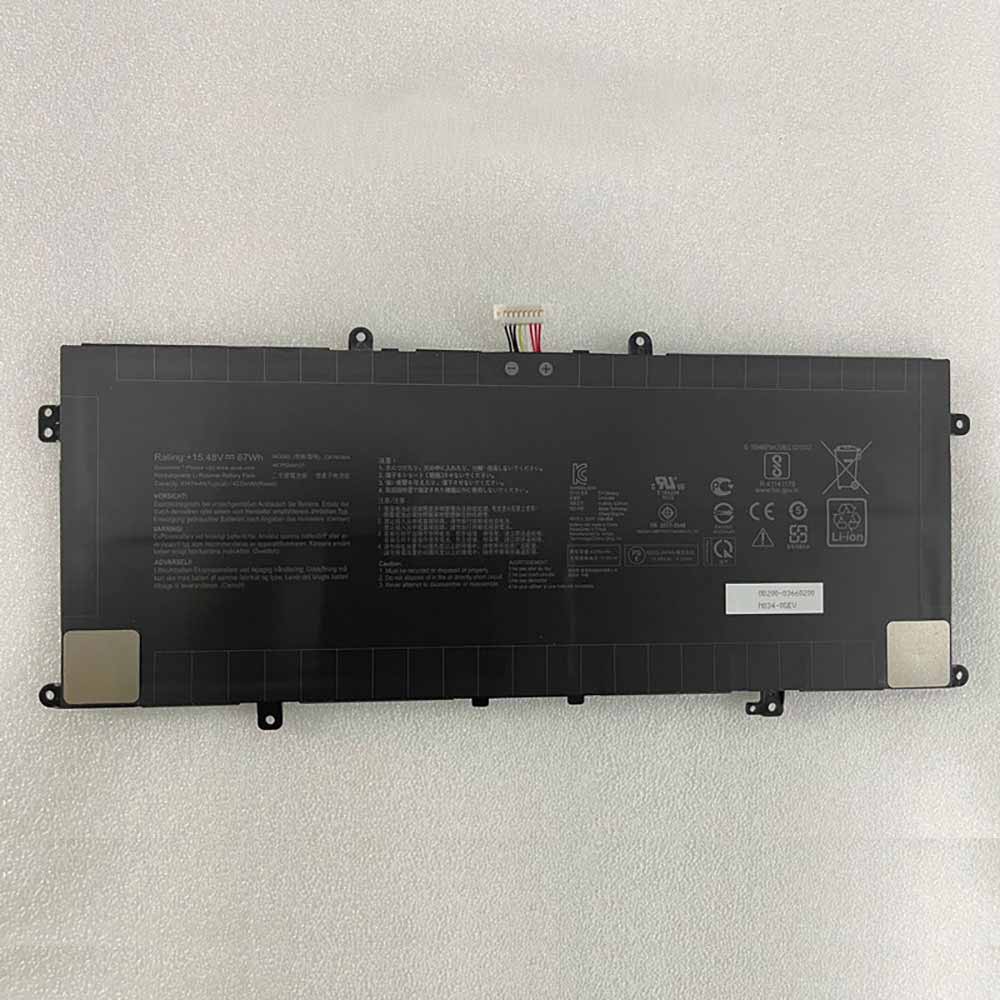 Product SpecificationsBrand: Asus Laptop BatteryBattery Type: Li-ionBattery Voltage: 15.48V/17.8VBattery Capacity: 67Wh/4220mahWarranty: 30 Days Money Back, 1 Year Warranty.Over 500-800 times of charge and discharge.Compatible Part Numbers:
Compatible Models:Asus C41N1904-1 UX325JA UX393JA UX425IA UX425JAAs a professional manufacturer, we offer a 100% brand new Li-ion battery for Asus C41N1904, built with genuine Grade A cells to ensure high quality and stable performance. Certified by CE, ROHS, and MSDS, this battery delivers excellent discharge characteristics and supports over 500–800 charge cycles.It is fully compatible with original Fujitsu equipment and features multiple built-in protections including over-charge, over-current, over-voltage, and short-circuit prevention. Designed with an advanced printed circuit board (PCB), it provides reliable and safe operation.Backed by a one-year warranty, 30-day money-back guarantee, and 100% secure shopping assurance, we provide premium performance at a competitive price.To ensure optimal performance and longevity of your Asus C41N1904 Battery, please adhere to the following guidelines:1.Storage - Store the battery C41N1904 in a clean, dry, and cool environment, away from heat sources and metal objects. During storage, the battery will gradually self-discharge. It is recommended to store it at approximately 40% state of charge.2.Charging and Discharging - Unlike older battery technologies, lithium-ion batteries do not require frequent full discharge cycles. Only perform a full discharge approximately every 30 charging cycles. Avoid charging the battery beyond its specified threshold voltage.3.Regular Use - Avoid leaving the battery C41N1904 idle for extended periods. It is advisable to use the battery at least once every two to three weeks. If the battery has been unused for a long time, follow the initial break-in procedure as recommended for new batteries.4.Calibration - If the battery indicator shows 76% or less during use, fully charge it, then fully discharge it, and finally recharge it completely to calibrate the battery level accuracy.5.Usage on Fixed Power - Consider removing the battery from the laptop when using a fixed power source for extended periods to reduce unnecessary charging cycles.6.Short-Circuit Prevention - Do not short-circuit the battery, as this can cause serious damage and compromise safety.By following these practices, you can help maintain the performance and extend the life of your Asus C41N1904 Battery.
Product SpecificationsBrand: Asus Laptop BatteryBattery Type: Li-ionBattery Voltage: 15.48V/17.8VBattery Capacity: 67Wh/4220mahWarranty: 30 Days Money Back, 1 Year Warranty.Over 500-800 times of charge and discharge.Compatible Part Numbers:
Compatible Models:Asus C41N1904-1 UX325JA UX393JA UX425IA UX425JAAs a professional manufacturer, we offer a 100% brand new Li-ion battery for Asus C41N1904, built with genuine Grade A cells to ensure high quality and stable performance. Certified by CE, ROHS, and MSDS, this battery delivers excellent discharge characteristics and supports over 500–800 charge cycles.It is fully compatible with original Fujitsu equipment and features multiple built-in protections including over-charge, over-current, over-voltage, and short-circuit prevention. Designed with an advanced printed circuit board (PCB), it provides reliable and safe operation.Backed by a one-year warranty, 30-day money-back guarantee, and 100% secure shopping assurance, we provide premium performance at a competitive price.To ensure optimal performance and longevity of your Asus C41N1904 Battery, please adhere to the following guidelines:1.Storage - Store the battery C41N1904 in a clean, dry, and cool environment, away from heat sources and metal objects. During storage, the battery will gradually self-discharge. It is recommended to store it at approximately 40% state of charge.2.Charging and Discharging - Unlike older battery technologies, lithium-ion batteries do not require frequent full discharge cycles. Only perform a full discharge approximately every 30 charging cycles. Avoid charging the battery beyond its specified threshold voltage.3.Regular Use - Avoid leaving the battery C41N1904 idle for extended periods. It is advisable to use the battery at least once every two to three weeks. If the battery has been unused for a long time, follow the initial break-in procedure as recommended for new batteries.4.Calibration - If the battery indicator shows 76% or less during use, fully charge it, then fully discharge it, and finally recharge it completely to calibrate the battery level accuracy.5.Usage on Fixed Power - Consider removing the battery from the laptop when using a fixed power source for extended periods to reduce unnecessary charging cycles.6.Short-Circuit Prevention - Do not short-circuit the battery, as this can cause serious damage and compromise safety.By following these practices, you can help maintain the performance and extend the life of your Asus C41N1904 Battery.
-
10000mAh S67 Replacement Battery for Oukitel S67
Our brand-new Smartphone Battery compatible with Oukitel S67 is engineered to deliver long-lasting and stable performance. It is designed to meet rigorous standards, ensuring full compatibility with devices such as the Oukitel S67. This battery comes with a one-year warranty and has passed essential safety certifications including CE, RoHS, and ISO9001. Choose our Oukitel S67 battery for a power solution that combines quality, safety, and convenience. Invest in authentic performance and keep your Oukitel S67 running like new.
10000mAh S67 Replacement Battery for Oukitel S67
 Product SpecificationsBrand: Oukitel Smartphone BatteryBattery Type: Li-ionBattery Voltage: 3.85VBattery Capacity: 10000mAhWarranty: 30 Days Money Back, 1 Year Warranty.Over 500-800 times of charge and discharge.Compatible Part Numbers:
Compatible Models:for Oukitel S67As a professional manufacturer, we offer a 100% brand new Li-ion battery for Oukitel S67, built with genuine Grade A cells to ensure high quality and stable performance. Certified by CE, ROHS, and MSDS, this battery delivers excellent discharge characteristics and supports over 500–800 charge cycles.It is fully compatible with original Fujitsu equipment and features multiple built-in protections including over-charge, over-current, over-voltage, and short-circuit prevention. Designed with an advanced printed circuit board (PCB), it provides reliable and safe operation.Backed by a one-year warranty, 30-day money-back guarantee, and 100% secure shopping assurance, we provide premium performance at a competitive price.To ensure optimal performance and longevity of your Oukitel S67 Battery, please adhere to the following guidelines:1.Storage - Store the battery S67 in a clean, dry, and cool environment, away from heat sources and metal objects. During storage, the battery will gradually self-discharge. It is recommended to store it at approximately 40% state of charge.2.Charging and Discharging - Unlike older battery technologies, lithium-ion batteries do not require frequent full discharge cycles. Only perform a full discharge approximately every 30 charging cycles. Avoid charging the battery beyond its specified threshold voltage.3.Regular Use - Avoid leaving the battery S67 idle for extended periods. It is advisable to use the battery at least once every two to three weeks. If the battery has been unused for a long time, follow the initial break-in procedure as recommended for new batteries.4.Calibration - If the battery indicator shows 76% or less during use, fully charge it, then fully discharge it, and finally recharge it completely to calibrate the battery level accuracy.5.Usage on Fixed Power - Consider removing the battery from the laptop when using a fixed power source for extended periods to reduce unnecessary charging cycles.6.Short-Circuit Prevention - Do not short-circuit the battery, as this can cause serious damage and compromise safety.By following these practices, you can help maintain the performance and extend the life of your Oukitel S67 Battery.
Product SpecificationsBrand: Oukitel Smartphone BatteryBattery Type: Li-ionBattery Voltage: 3.85VBattery Capacity: 10000mAhWarranty: 30 Days Money Back, 1 Year Warranty.Over 500-800 times of charge and discharge.Compatible Part Numbers:
Compatible Models:for Oukitel S67As a professional manufacturer, we offer a 100% brand new Li-ion battery for Oukitel S67, built with genuine Grade A cells to ensure high quality and stable performance. Certified by CE, ROHS, and MSDS, this battery delivers excellent discharge characteristics and supports over 500–800 charge cycles.It is fully compatible with original Fujitsu equipment and features multiple built-in protections including over-charge, over-current, over-voltage, and short-circuit prevention. Designed with an advanced printed circuit board (PCB), it provides reliable and safe operation.Backed by a one-year warranty, 30-day money-back guarantee, and 100% secure shopping assurance, we provide premium performance at a competitive price.To ensure optimal performance and longevity of your Oukitel S67 Battery, please adhere to the following guidelines:1.Storage - Store the battery S67 in a clean, dry, and cool environment, away from heat sources and metal objects. During storage, the battery will gradually self-discharge. It is recommended to store it at approximately 40% state of charge.2.Charging and Discharging - Unlike older battery technologies, lithium-ion batteries do not require frequent full discharge cycles. Only perform a full discharge approximately every 30 charging cycles. Avoid charging the battery beyond its specified threshold voltage.3.Regular Use - Avoid leaving the battery S67 idle for extended periods. It is advisable to use the battery at least once every two to three weeks. If the battery has been unused for a long time, follow the initial break-in procedure as recommended for new batteries.4.Calibration - If the battery indicator shows 76% or less during use, fully charge it, then fully discharge it, and finally recharge it completely to calibrate the battery level accuracy.5.Usage on Fixed Power - Consider removing the battery from the laptop when using a fixed power source for extended periods to reduce unnecessary charging cycles.6.Short-Circuit Prevention - Do not short-circuit the battery, as this can cause serious damage and compromise safety.By following these practices, you can help maintain the performance and extend the life of your Oukitel S67 Battery.
-
97Wh 1FXDH Replacement Battery for Dell Latitude 5501
Our brand-new Laptop Battery compatible with Dell 1FXDH is engineered to deliver long-lasting and stable performance. It is designed to meet rigorous standards, ensuring full compatibility with devices such as the Dell Latitude 5501. This battery comes with a one-year warranty and has passed essential safety certifications including CE, RoHS, and ISO9001. Choose our Dell 1FXDH battery for a power solution that combines quality, safety, and convenience. Invest in authentic performance and keep your Dell Latitude 5501 running like new.
97Wh 1FXDH Replacement Battery for Dell Latitude 5501
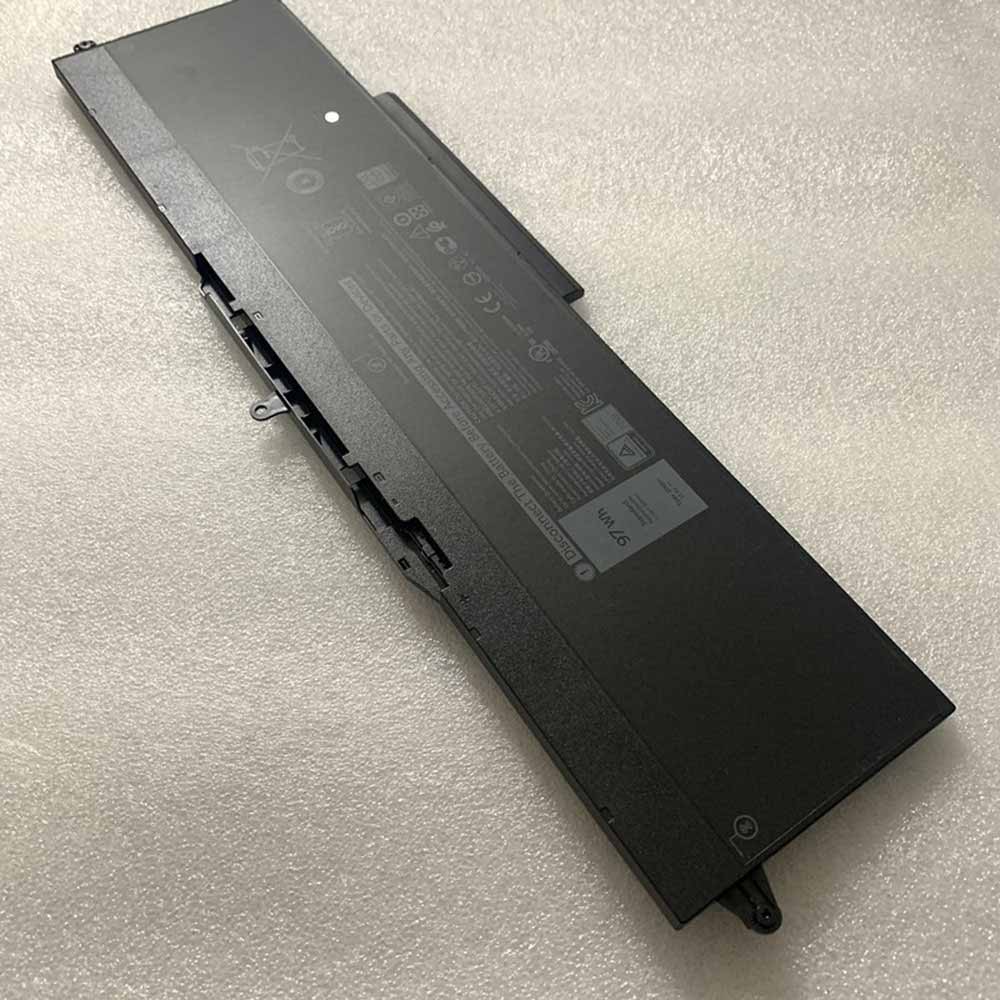 Product SpecificationsBrand: Dell Laptop BatteryBattery Type: Li-ionBattery Voltage: 11.4VBattery Capacity: 97WhWarranty: 30 Days Money Back, 1 Year Warranty.Over 500-800 times of charge and discharge.Compatible Part Numbers:
Compatible Models:Dell Latitude 5501As a professional manufacturer, we offer a 100% brand new Li-ion battery for Dell 1FXDH, built with genuine Grade A cells to ensure high quality and stable performance. Certified by CE, ROHS, and MSDS, this battery delivers excellent discharge characteristics and supports over 500–800 charge cycles.It is fully compatible with original Fujitsu equipment and features multiple built-in protections including over-charge, over-current, over-voltage, and short-circuit prevention. Designed with an advanced printed circuit board (PCB), it provides reliable and safe operation.Backed by a one-year warranty, 30-day money-back guarantee, and 100% secure shopping assurance, we provide premium performance at a competitive price.To ensure optimal performance and longevity of your Dell 1FXDH Battery, please adhere to the following guidelines:1.Storage - Store the battery 1FXDH in a clean, dry, and cool environment, away from heat sources and metal objects. During storage, the battery will gradually self-discharge. It is recommended to store it at approximately 40% state of charge.2.Charging and Discharging - Unlike older battery technologies, lithium-ion batteries do not require frequent full discharge cycles. Only perform a full discharge approximately every 30 charging cycles. Avoid charging the battery beyond its specified threshold voltage.3.Regular Use - Avoid leaving the battery 1FXDH idle for extended periods. It is advisable to use the battery at least once every two to three weeks. If the battery has been unused for a long time, follow the initial break-in procedure as recommended for new batteries.4.Calibration - If the battery indicator shows 76% or less during use, fully charge it, then fully discharge it, and finally recharge it completely to calibrate the battery level accuracy.5.Usage on Fixed Power - Consider removing the battery from the laptop when using a fixed power source for extended periods to reduce unnecessary charging cycles.6.Short-Circuit Prevention - Do not short-circuit the battery, as this can cause serious damage and compromise safety.By following these practices, you can help maintain the performance and extend the life of your Dell 1FXDH Battery.
Product SpecificationsBrand: Dell Laptop BatteryBattery Type: Li-ionBattery Voltage: 11.4VBattery Capacity: 97WhWarranty: 30 Days Money Back, 1 Year Warranty.Over 500-800 times of charge and discharge.Compatible Part Numbers:
Compatible Models:Dell Latitude 5501As a professional manufacturer, we offer a 100% brand new Li-ion battery for Dell 1FXDH, built with genuine Grade A cells to ensure high quality and stable performance. Certified by CE, ROHS, and MSDS, this battery delivers excellent discharge characteristics and supports over 500–800 charge cycles.It is fully compatible with original Fujitsu equipment and features multiple built-in protections including over-charge, over-current, over-voltage, and short-circuit prevention. Designed with an advanced printed circuit board (PCB), it provides reliable and safe operation.Backed by a one-year warranty, 30-day money-back guarantee, and 100% secure shopping assurance, we provide premium performance at a competitive price.To ensure optimal performance and longevity of your Dell 1FXDH Battery, please adhere to the following guidelines:1.Storage - Store the battery 1FXDH in a clean, dry, and cool environment, away from heat sources and metal objects. During storage, the battery will gradually self-discharge. It is recommended to store it at approximately 40% state of charge.2.Charging and Discharging - Unlike older battery technologies, lithium-ion batteries do not require frequent full discharge cycles. Only perform a full discharge approximately every 30 charging cycles. Avoid charging the battery beyond its specified threshold voltage.3.Regular Use - Avoid leaving the battery 1FXDH idle for extended periods. It is advisable to use the battery at least once every two to three weeks. If the battery has been unused for a long time, follow the initial break-in procedure as recommended for new batteries.4.Calibration - If the battery indicator shows 76% or less during use, fully charge it, then fully discharge it, and finally recharge it completely to calibrate the battery level accuracy.5.Usage on Fixed Power - Consider removing the battery from the laptop when using a fixed power source for extended periods to reduce unnecessary charging cycles.6.Short-Circuit Prevention - Do not short-circuit the battery, as this can cause serious damage and compromise safety.By following these practices, you can help maintain the performance and extend the life of your Dell 1FXDH Battery.
最新記事
(09/10)
(09/10)
(09/10)
(09/10)
(09/04)