
-
2000mAh BP-617 Replacement Battery for Canon DV-MV100/MV20
The 2000mAh Canon BP-617 Camera Battery is specially designed as a high-quality replacement battery for Canon DV-MV100/MV20. With stable performance, long-lasting power capacity, and excellent compatibility, this Canon BP-617 battery helps restore your equipment’s mobility and extends its daily working time. It is an ideal choice for users who need to replace an aging or damaged battery while keeping their Canon DV-MV100/MV20 running efficiently.
2000mAh BP-617 Replacement Battery for Canon DV-MV100/MV20
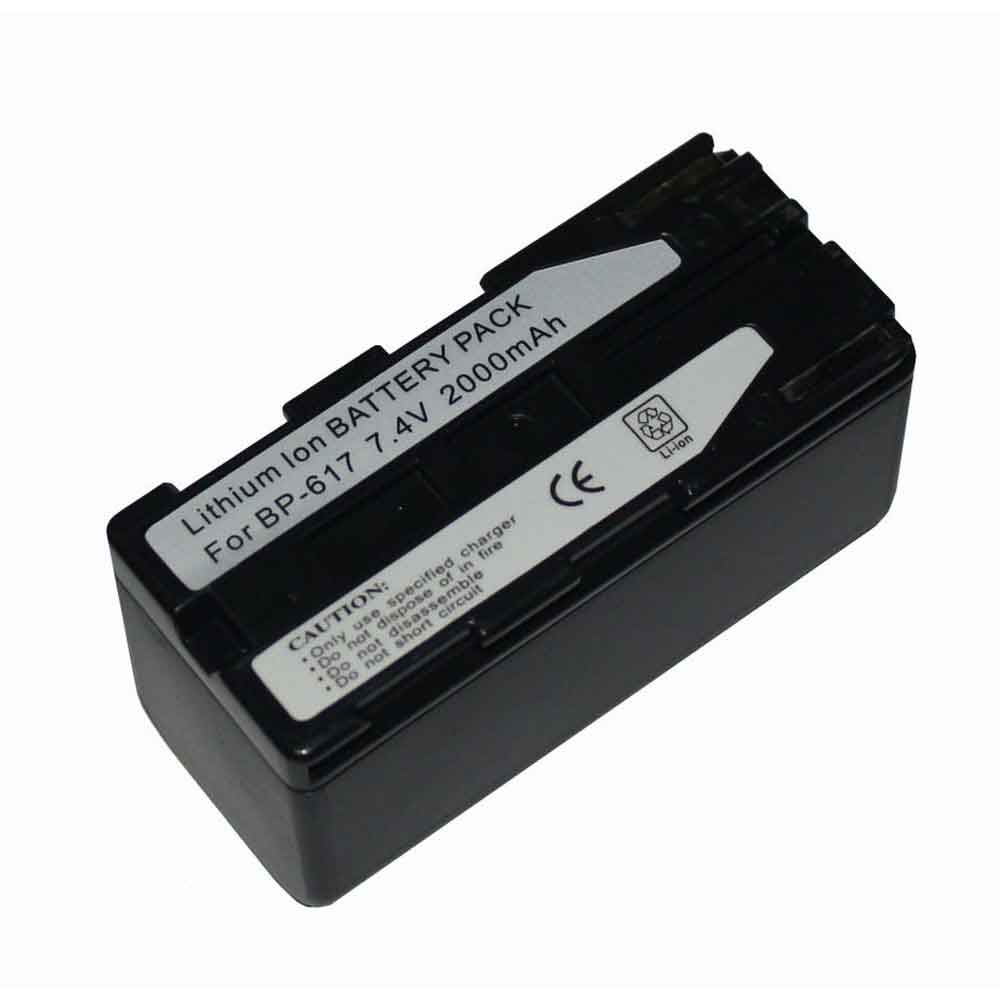 Product SpecificationsBrand: Camera Battery for CanonBattery Type: Li-ionBattery Voltage: 7.4VBattery Capacity: 2000mAhWarranty: 30 Days Money Back, 1 Year Warranty.Over 500-800 times of charge and discharge.Compatible Part Numbers:BP-617Compatible Models:Canon DV-MV100/MV20Important Usage Tips and Safety PrecautionsFor safe and effective operation of the 2000mAh Canon BP-617 Camera Battery for Canon DV-MV100/MV20, please consider the following precautions:Do not expose the battery to water, moisture, or extreme heat.Do not disassemble, modify, or damage the battery, as this may cause safety risks.Avoid using damaged charging cables or incompatible adapters.If the Canon BP-617 battery becomes swollen, overheated, or shows unusual performance, stop using it immediately and seek professional assistance.Allow the Canon BP-617 battery to complete several normal charge and discharge cycles after installation to help achieve optimal performance. A Reliable Power Solution for Your Canon DV-MV100/MV20.How to Properly Maintain Your Canon BP-617 Camera BatteryTo maximize the lifespan and performance of your Canon BP-617 Camera Battery, following proper maintenance habits is important:Avoid frequent full discharge: Try to recharge the battery before it completely runs out of power. Keeping the Canon BP-617 battery level between approximately 20% and 80% can help reduce battery stress.Use the correct charger: Always use a compatible charger with the correct voltage and specifications to ensure safe and efficient charging.Keep the battery temperature controlled: Excessive heat can affect Canon BP-617 battery performance and lifespan. Avoid using your equipment on soft surfaces that block ventilation, and keep the device away from high-temperature environments.Charge regularly during storage: If you do not use your equipment for an extended period, charge the battery to around 40%-60% and store it in a cool, dry place.Maintain clean connections: Keep the Canon BP-617 battery contacts and equipment interior free from dust to ensure stable power transmission.A Reliable Power Solution for Your Canon DV-MV100/MV20The 2000mAh Canon BP-617 Camera Battery for Canon DV-MV100/MV20 combines dependable power, convenient installation, and long-term usability. With proper care and responsible usage, this replacement battery can help extend your laptop’s service life and provide a more stable mobile computing experience.Choose a quality replacement battery for Canon BP-617 to bring your Canon DV-MV100/MV20 back to its full potential and enjoy reliable performance wherever you go.
PR
-
7200mAh 427308 Replacement Battery for Ansul 427308 423520 427312 426518 B485529
The 7200mAh Ansul 427308 Consumer Electronics Battery is specially designed as a high-quality replacement battery for Ansul 427308 423520 427312 426518 B485529. With stable performance, long-lasting power capacity, and excellent compatibility, this Ansul 427308 battery helps restore your equipment’s mobility and extends its daily working time. It is an ideal choice for users who need to replace an aging or damaged battery while keeping their Ansul 427308 423520 427312 426518 B485529 running efficiently.
7200mAh 427308 Replacement Battery for Ansul 427308 423520 427312 426518 B485529
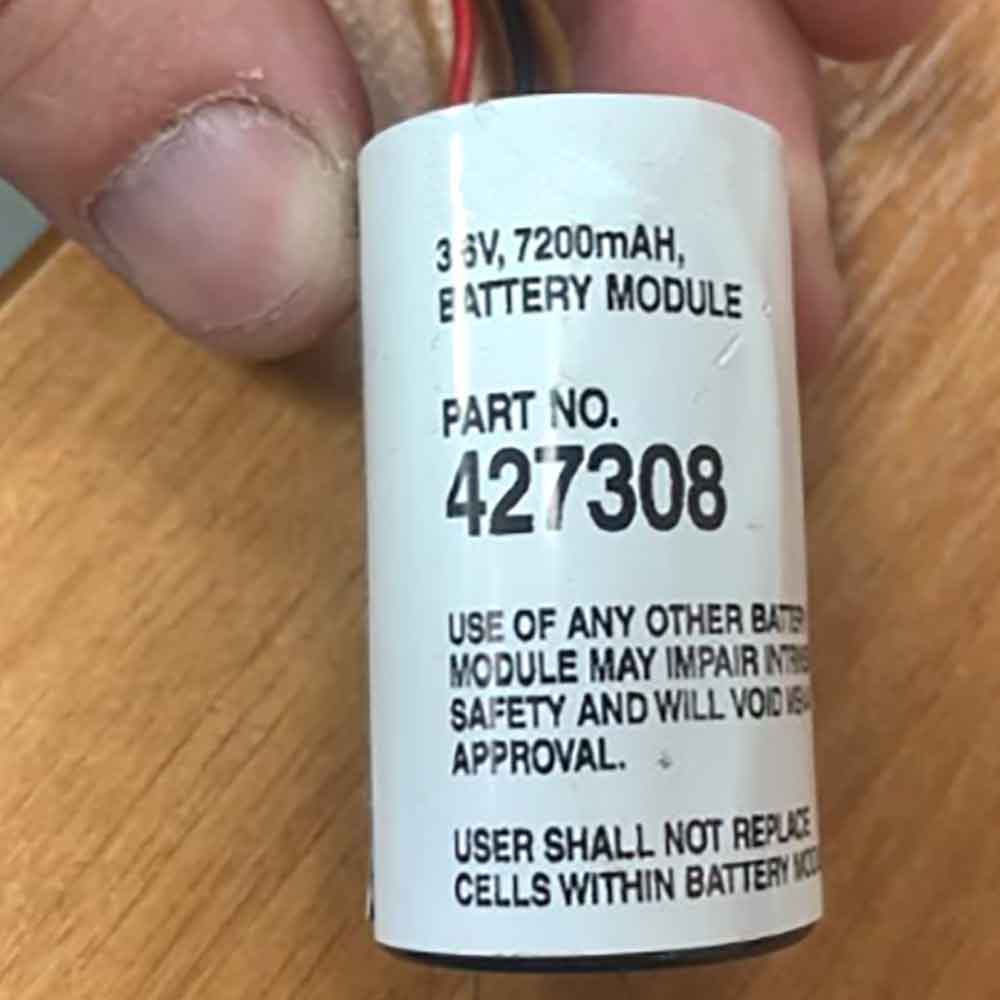 Product SpecificationsBrand: Consumer Electronics Battery for AnsulBattery Type: Li-ionBattery Voltage: 3.6VBattery Capacity: 7200mAhWarranty: 30 Days Money Back, 1 Year Warranty.Over 500-800 times of charge and discharge.Compatible Part Numbers:427308Compatible Models:Ansul 427308 423520 427312 426518 B485529Important Usage Tips and Safety PrecautionsFor safe and effective operation of the 7200mAh Ansul 427308 Consumer Electronics Battery for Ansul 427308 423520 427312 426518 B485529, please consider the following precautions:Do not expose the battery to water, moisture, or extreme heat.Do not disassemble, modify, or damage the battery, as this may cause safety risks.Avoid using damaged charging cables or incompatible adapters.If the Ansul 427308 battery becomes swollen, overheated, or shows unusual performance, stop using it immediately and seek professional assistance.Allow the Ansul 427308 battery to complete several normal charge and discharge cycles after installation to help achieve optimal performance. A Reliable Power Solution for Your Ansul 427308 423520 427312 426518 B485529.How to Properly Maintain Your Ansul 427308 Consumer Electronics BatteryTo maximize the lifespan and performance of your Ansul 427308 Consumer Electronics Battery, following proper maintenance habits is important:Avoid frequent full discharge: Try to recharge the battery before it completely runs out of power. Keeping the Ansul 427308 battery level between approximately 20% and 80% can help reduce battery stress.Use the correct charger: Always use a compatible charger with the correct voltage and specifications to ensure safe and efficient charging.Keep the battery temperature controlled: Excessive heat can affect Ansul 427308 battery performance and lifespan. Avoid using your equipment on soft surfaces that block ventilation, and keep the device away from high-temperature environments.Charge regularly during storage: If you do not use your equipment for an extended period, charge the battery to around 40%-60% and store it in a cool, dry place.Maintain clean connections: Keep the Ansul 427308 battery contacts and equipment interior free from dust to ensure stable power transmission.A Reliable Power Solution for Your Ansul 427308 423520 427312 426518 B485529The 7200mAh Ansul 427308 Consumer Electronics Battery for Ansul 427308 423520 427312 426518 B485529 combines dependable power, convenient installation, and long-term usability. With proper care and responsible usage, this replacement battery can help extend your laptop’s service life and provide a more stable mobile computing experience.Choose a quality replacement battery for Ansul 427308 to bring your Ansul 427308 423520 427312 426518 B485529 back to its full potential and enjoy reliable performance wherever you go.
-
1800mAh TBL-55A1800 Replacement Battery for TP-Link M730 Wifi Mifi
The 1800mAh TP-Link TBL-55A1800 Wireless Router Battery is specially designed as a high-quality replacement battery for TP-Link M730 Wifi Mifi. With stable performance, long-lasting power capacity, and excellent compatibility, this TP-Link TBL-55A1800 battery helps restore your equipment’s mobility and extends its daily working time. It is an ideal choice for users who need to replace an aging or damaged battery while keeping their TP-Link M730 Wifi Mifi running efficiently.
1800mAh TBL-55A1800 Replacement Battery for TP-Link M730 Wifi Mifi
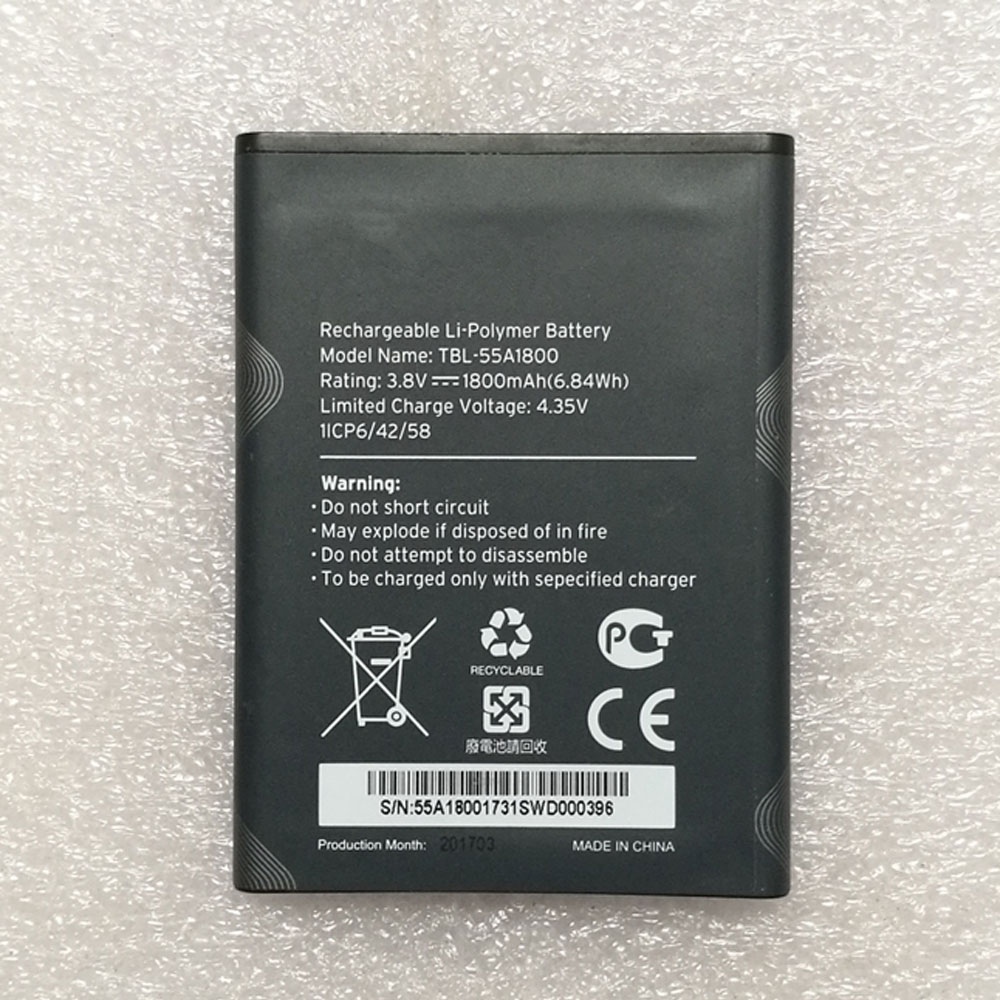 Product SpecificationsBrand: Wireless Router Battery for TP-LinkBattery Type: Li-PolymerBattery Voltage: 3.8VBattery Capacity: 1800mAhWarranty: 30 Days Money Back, 1 Year Warranty.Over 500-800 times of charge and discharge.Compatible Part Numbers:TBL-55A1800Compatible Models:for TP-Link M730 Wifi MifiImportant Usage Tips and Safety PrecautionsFor safe and effective operation of the 1800mAh TP-Link TBL-55A1800 Wireless Router Battery for TP-Link M730 Wifi Mifi, please consider the following precautions:Do not expose the battery to water, moisture, or extreme heat.Do not disassemble, modify, or damage the battery, as this may cause safety risks.Avoid using damaged charging cables or incompatible adapters.If the TP-Link TBL-55A1800 battery becomes swollen, overheated, or shows unusual performance, stop using it immediately and seek professional assistance.Allow the TP-Link TBL-55A1800 battery to complete several normal charge and discharge cycles after installation to help achieve optimal performance. A Reliable Power Solution for Your TP-Link M730 Wifi Mifi.How to Properly Maintain Your TP-Link TBL-55A1800 Wireless Router BatteryTo maximize the lifespan and performance of your TP-Link TBL-55A1800 Wireless Router Battery, following proper maintenance habits is important:Avoid frequent full discharge: Try to recharge the battery before it completely runs out of power. Keeping the TP-Link TBL-55A1800 battery level between approximately 20% and 80% can help reduce battery stress.Use the correct charger: Always use a compatible charger with the correct voltage and specifications to ensure safe and efficient charging.Keep the battery temperature controlled: Excessive heat can affect TP-Link TBL-55A1800 battery performance and lifespan. Avoid using your equipment on soft surfaces that block ventilation, and keep the device away from high-temperature environments.Charge regularly during storage: If you do not use your equipment for an extended period, charge the battery to around 40%-60% and store it in a cool, dry place.Maintain clean connections: Keep the TP-Link TBL-55A1800 battery contacts and equipment interior free from dust to ensure stable power transmission.A Reliable Power Solution for Your TP-Link M730 Wifi MifiThe 1800mAh TP-Link TBL-55A1800 Wireless Router Battery for TP-Link M730 Wifi Mifi combines dependable power, convenient installation, and long-term usability. With proper care and responsible usage, this replacement battery can help extend your laptop’s service life and provide a more stable mobile computing experience.Choose a quality replacement battery for TP-Link TBL-55A1800 to bring your TP-Link M730 Wifi Mifi back to its full potential and enjoy reliable performance wherever you go.
-
2500mAh BL-AS53H Replacement Battery for Baofeng AS53M
The 2500mAh Baofeng BL-AS53H Radio Communication Battery is specially designed as a high-quality replacement battery for Baofeng AS53M. With stable performance, long-lasting power capacity, and excellent compatibility, this Baofeng BL-AS53H battery helps restore your equipment’s mobility and extends its daily working time. It is an ideal choice for users who need to replace an aging or damaged battery while keeping their Baofeng AS53M running efficiently.
2500mAh BL-AS53H Replacement Battery for Baofeng AS53M
.jpg) Product SpecificationsBrand: Radio Communication Battery for BaofengBattery Type: Li-ionBattery Voltage: 7.4VBattery Capacity: 2500mAhWarranty: 30 Days Money Back, 1 Year Warranty.Over 500-800 times of charge and discharge.Compatible Part Numbers:BL-AS53HCompatible Models:for Baofeng AS53MImportant Usage Tips and Safety PrecautionsFor safe and effective operation of the 2500mAh Baofeng BL-AS53H Radio Communication Battery for Baofeng AS53M, please consider the following precautions:Do not expose the battery to water, moisture, or extreme heat.Do not disassemble, modify, or damage the battery, as this may cause safety risks.Avoid using damaged charging cables or incompatible adapters.If the Baofeng BL-AS53H battery becomes swollen, overheated, or shows unusual performance, stop using it immediately and seek professional assistance.Allow the Baofeng BL-AS53H battery to complete several normal charge and discharge cycles after installation to help achieve optimal performance. A Reliable Power Solution for Your Baofeng AS53M.How to Properly Maintain Your Baofeng BL-AS53H Radio Communication BatteryTo maximize the lifespan and performance of your Baofeng BL-AS53H Radio Communication Battery, following proper maintenance habits is important:Avoid frequent full discharge: Try to recharge the battery before it completely runs out of power. Keeping the Baofeng BL-AS53H battery level between approximately 20% and 80% can help reduce battery stress.Use the correct charger: Always use a compatible charger with the correct voltage and specifications to ensure safe and efficient charging.Keep the battery temperature controlled: Excessive heat can affect Baofeng BL-AS53H battery performance and lifespan. Avoid using your equipment on soft surfaces that block ventilation, and keep the device away from high-temperature environments.Charge regularly during storage: If you do not use your equipment for an extended period, charge the battery to around 40%-60% and store it in a cool, dry place.Maintain clean connections: Keep the Baofeng BL-AS53H battery contacts and equipment interior free from dust to ensure stable power transmission.A Reliable Power Solution for Your Baofeng AS53MThe 2500mAh Baofeng BL-AS53H Radio Communication Battery for Baofeng AS53M combines dependable power, convenient installation, and long-term usability. With proper care and responsible usage, this replacement battery can help extend your laptop’s service life and provide a more stable mobile computing experience.Choose a quality replacement battery for Baofeng BL-AS53H to bring your Baofeng AS53M back to its full potential and enjoy reliable performance wherever you go.
Product SpecificationsBrand: Radio Communication Battery for BaofengBattery Type: Li-ionBattery Voltage: 7.4VBattery Capacity: 2500mAhWarranty: 30 Days Money Back, 1 Year Warranty.Over 500-800 times of charge and discharge.Compatible Part Numbers:BL-AS53HCompatible Models:for Baofeng AS53MImportant Usage Tips and Safety PrecautionsFor safe and effective operation of the 2500mAh Baofeng BL-AS53H Radio Communication Battery for Baofeng AS53M, please consider the following precautions:Do not expose the battery to water, moisture, or extreme heat.Do not disassemble, modify, or damage the battery, as this may cause safety risks.Avoid using damaged charging cables or incompatible adapters.If the Baofeng BL-AS53H battery becomes swollen, overheated, or shows unusual performance, stop using it immediately and seek professional assistance.Allow the Baofeng BL-AS53H battery to complete several normal charge and discharge cycles after installation to help achieve optimal performance. A Reliable Power Solution for Your Baofeng AS53M.How to Properly Maintain Your Baofeng BL-AS53H Radio Communication BatteryTo maximize the lifespan and performance of your Baofeng BL-AS53H Radio Communication Battery, following proper maintenance habits is important:Avoid frequent full discharge: Try to recharge the battery before it completely runs out of power. Keeping the Baofeng BL-AS53H battery level between approximately 20% and 80% can help reduce battery stress.Use the correct charger: Always use a compatible charger with the correct voltage and specifications to ensure safe and efficient charging.Keep the battery temperature controlled: Excessive heat can affect Baofeng BL-AS53H battery performance and lifespan. Avoid using your equipment on soft surfaces that block ventilation, and keep the device away from high-temperature environments.Charge regularly during storage: If you do not use your equipment for an extended period, charge the battery to around 40%-60% and store it in a cool, dry place.Maintain clean connections: Keep the Baofeng BL-AS53H battery contacts and equipment interior free from dust to ensure stable power transmission.A Reliable Power Solution for Your Baofeng AS53MThe 2500mAh Baofeng BL-AS53H Radio Communication Battery for Baofeng AS53M combines dependable power, convenient installation, and long-term usability. With proper care and responsible usage, this replacement battery can help extend your laptop’s service life and provide a more stable mobile computing experience.Choose a quality replacement battery for Baofeng BL-AS53H to bring your Baofeng AS53M back to its full potential and enjoy reliable performance wherever you go.
-
2100mAh SBR-43LI Replacement Battery for Standard horizon HX320
The 2100mAh Standard SBR-43LI Radio Communication Battery is specially designed as a high-quality replacement battery for Standard horizon HX320. With stable performance, long-lasting power capacity, and excellent compatibility, this Standard SBR-43LI battery helps restore your equipment’s mobility and extends its daily working time. It is an ideal choice for users who need to replace an aging or damaged battery while keeping their Standard horizon HX320 running efficiently.
2100mAh SBR-43LI Replacement Battery for Standard horizon HX320
.jpg) Product SpecificationsBrand: Radio Communication Battery for StandardBattery Type: Li-ionBattery Voltage: 7.4VBattery Capacity: 2100mAhWarranty: 30 Days Money Back, 1 Year Warranty.Over 500-800 times of charge and discharge.Compatible Part Numbers:SBR-43LICompatible Models:for Standard Horizon HX320Important Usage Tips and Safety PrecautionsFor safe and effective operation of the 2100mAh Standard SBR-43LI Radio Communication Battery for Standard horizon HX320, please consider the following precautions:Do not expose the battery to water, moisture, or extreme heat.Do not disassemble, modify, or damage the battery, as this may cause safety risks.Avoid using damaged charging cables or incompatible adapters.If the Standard SBR-43LI battery becomes swollen, overheated, or shows unusual performance, stop using it immediately and seek professional assistance.Allow the Standard SBR-43LI battery to complete several normal charge and discharge cycles after installation to help achieve optimal performance. A Reliable Power Solution for Your Standard horizon HX320.How to Properly Maintain Your Standard SBR-43LI Radio Communication BatteryTo maximize the lifespan and performance of your Standard SBR-43LI Radio Communication Battery, following proper maintenance habits is important:Avoid frequent full discharge: Try to recharge the battery before it completely runs out of power. Keeping the Standard SBR-43LI battery level between approximately 20% and 80% can help reduce battery stress.Use the correct charger: Always use a compatible charger with the correct voltage and specifications to ensure safe and efficient charging.Keep the battery temperature controlled: Excessive heat can affect Standard SBR-43LI battery performance and lifespan. Avoid using your equipment on soft surfaces that block ventilation, and keep the device away from high-temperature environments.Charge regularly during storage: If you do not use your equipment for an extended period, charge the battery to around 40%-60% and store it in a cool, dry place.Maintain clean connections: Keep the Standard SBR-43LI battery contacts and equipment interior free from dust to ensure stable power transmission.A Reliable Power Solution for Your Standard horizon HX320The 2100mAh Standard SBR-43LI Radio Communication Battery for Standard horizon HX320 combines dependable power, convenient installation, and long-term usability. With proper care and responsible usage, this replacement battery can help extend your laptop’s service life and provide a more stable mobile computing experience.Choose a quality replacement battery for Standard SBR-43LI to bring your Standard horizon HX320 back to its full potential and enjoy reliable performance wherever you go.
Product SpecificationsBrand: Radio Communication Battery for StandardBattery Type: Li-ionBattery Voltage: 7.4VBattery Capacity: 2100mAhWarranty: 30 Days Money Back, 1 Year Warranty.Over 500-800 times of charge and discharge.Compatible Part Numbers:SBR-43LICompatible Models:for Standard Horizon HX320Important Usage Tips and Safety PrecautionsFor safe and effective operation of the 2100mAh Standard SBR-43LI Radio Communication Battery for Standard horizon HX320, please consider the following precautions:Do not expose the battery to water, moisture, or extreme heat.Do not disassemble, modify, or damage the battery, as this may cause safety risks.Avoid using damaged charging cables or incompatible adapters.If the Standard SBR-43LI battery becomes swollen, overheated, or shows unusual performance, stop using it immediately and seek professional assistance.Allow the Standard SBR-43LI battery to complete several normal charge and discharge cycles after installation to help achieve optimal performance. A Reliable Power Solution for Your Standard horizon HX320.How to Properly Maintain Your Standard SBR-43LI Radio Communication BatteryTo maximize the lifespan and performance of your Standard SBR-43LI Radio Communication Battery, following proper maintenance habits is important:Avoid frequent full discharge: Try to recharge the battery before it completely runs out of power. Keeping the Standard SBR-43LI battery level between approximately 20% and 80% can help reduce battery stress.Use the correct charger: Always use a compatible charger with the correct voltage and specifications to ensure safe and efficient charging.Keep the battery temperature controlled: Excessive heat can affect Standard SBR-43LI battery performance and lifespan. Avoid using your equipment on soft surfaces that block ventilation, and keep the device away from high-temperature environments.Charge regularly during storage: If you do not use your equipment for an extended period, charge the battery to around 40%-60% and store it in a cool, dry place.Maintain clean connections: Keep the Standard SBR-43LI battery contacts and equipment interior free from dust to ensure stable power transmission.A Reliable Power Solution for Your Standard horizon HX320The 2100mAh Standard SBR-43LI Radio Communication Battery for Standard horizon HX320 combines dependable power, convenient installation, and long-term usability. With proper care and responsible usage, this replacement battery can help extend your laptop’s service life and provide a more stable mobile computing experience.Choose a quality replacement battery for Standard SBR-43LI to bring your Standard horizon HX320 back to its full potential and enjoy reliable performance wherever you go.
最新記事
(09/04)
(09/04)
(09/04)
(09/04)
(09/03)